Posts About Platform Updates
As we wrap up 2025, we’re excited to bring you enhancements that save you time, provide more clarity for students, and help you achieve even better learning. Refreshed HawkesLearning.com Now easier to navigate with quick links to get to the platform, the Hawkes Learning website brings you the latest news and a plethora of support, including on-demand resources! Instructor Experience More Freedom to Build the Perfect Assessment Supplemental Questions are now easier to find with a “Supplemental” tag. These are additional questions not part of your curriculum and allow you to discover more questions, add fresh, unseen items to WebTests for more variety or targeted assessment, and confidently explore beyond the set curriculum without guessing what students have or haven’t encountered. Section Setup is Faster and Easier! We’ve made section management faster and easier. You can now use the new Copy Section button to duplicate an existing section’s settings in just a few clicks. With a streamlined workflow and validated settings, creating new sections has never been simpler. Edit Scores Enhancements A more streamlined workflow is saving you time! Deep link straight to Edit Scores, update a graded Lesson with ease, and click on assignment names for faster assignment review. Plus, the Edit Scores page gets smarter with Assignment Status and Assignment groups, giving you all the context you need, right where you need it More Flexibility and Oversight! We’ve added more control to Advanced Section Settings. Other Assignment scores from previous terms will no longer transfer into new sections by default, saving you time manually adjusting scores. If you prefer to transfer other assignment scores between sections, simply adjust the Advanced Settings under the Actions dropdown within Manage Sections. Student Experience Increased Support in AI Tutor Responses We’ve improved the AI Tutor’s phrasing to support smoother, more continuous conversations. After reviewing student feedback, we made the update to help students continue exploring and asking questions, resulting in a more supportive experience. “Send to Instructor” Enhancement The Send to Instructor feature now reliably captures the full question, no matter the length. This is especially helpful in subjects like Statistics, where long tables or multi-part prompts could be lengthy. Instructors receive the complete context they need to quickly understand what the student is asking. *As a reminder, instructors need to enable this feature in their section within the Tools menu, under Display Options. Enhanced clarity and automation in the Inclusive Access Opt-Out Process We’ve packed in some powerful updates to the Inclusive Access experience! When a student opts out or drops a course, the course still appears on their dashboard with a clear explanation and easy way to restore access. Students automatically receive an email confirming the change, eliminating confusion. In addition, the purchase workflow is smoother than ever, and previous coursework stays accessible, making it simple for students to regain access and continue moving forward.
As we wrap up 2025, we’re excited to bring you enhancements that save you time,...
Read More
The Hawkes Team has released some powerful enhancements to provide an even better teaching and learning experience for all instructors and students. From easier grading and faster navigation to increased student understanding and better accessibility, we’ve heard your feedback and we’re listening! Instructor Experience Smarter Scoring and Faster Navigation for Edit Scores by Student Grading just got smoother! You will now see both Points Earned and Points Possible on the Edit Scores by Student page. This gives more flexibility in how scores are entered. Whether input by percentage or points, the other column updates automatically in real time. You can once again manage Other Assignment scores through Edit Scores by Student. Enter a new score by inputting the points or percentage earned or use the ‘Reset’ option to clear an existing grade and signal the student hasn’t yet received a score. With just a single click, you can easily navigate to the next student. Use the new left and right arrows to select the next student in the list without needing to open the dropdown menu. All Student Scores Report Update Need to remove credit for an assignment? You can now flip a graded Lesson or Other Assignment back to ‘Not Graded’ directly from the Edit Scores module in the All Student Scores Report, saving you time. To update a lesson, simply delete the date. To update an Other Assignment, delete the score or points earned. Instructor-Provided WebTest Direction Functionality is Here! Custom directions can now be added to WebTests, which will display directly in the student view, giving you more control and personalization to your assignments. Directions may include links that automatically open in a new window, providing students with easy access to additional resources or reference materials—all without leaving their test. Instructor Experience: Student Experience: Managing Section Templates is Now Easier than Ever! No more clicking through multiple pages to manage section templates. A new Manage Section Templates view (toggle) allows you to see all templates tied to a section in one place. Updates can be made directly within the Manage Sections view, allowing you to ensure accuracy and save time. User to User Messaging Enhancement Other instructors or colleagues within your school can now be added as recipients when emailing students. This makes it easier for all individuals to be in the loop on student communications, ensuring everyone stays aligned and informed. Student Experience Spanish Translation Live in AI Tutor – Early Launch AI Tutor has expanded to support Spanish-language tutoring. Students are now able to communicate with the AI Tutor in Spanish within a safe space by receiving clear, helpful answers in Spanish. This provides equitable support to a wider range of learners by reducing language barriers. Students simply type within the AI Tutor in Spanish, and AI Tutor will automatically respond in Spanish. Note: This is an early release of the tool and will be improved as we gain more student interaction and feedback. Accessibility Enhancements Hawkes Learning is committed to ensuring a better learning experience for all students and instructors. Each deployment is dedicated to delivering targeted accessibility improvements that address screen reader compatibility, keyboard navigation, and visual feedback. The Student Login page and buttons throughout the experience are updated to achieve full accessibility standards. As always, if you have any questions or need assistance, please don’t hesitate to reach out to our Customer Success Team any time at instructorsupport@hawkeslearning.com
October 9, 2025
The Hawkes Team has released some powerful enhancements to provide an even...
Read More
Detailed performance reporting and analytics allow you to keep a finger on the pulse of your classroom. Assignment Reviewer gives you not only a big-picture overview of class performance on assignments, but also a more in-depth look at performance on a per-student and per-question basis. Key features of Assignment Reviewer: Identify most commonly missed questions on each assignment. Check only one location for lesson-based AND WebTest-based data. Analyze data on a per-student and per-question basis. Check the due date status for any assignment. See the average time spent by your class in Learn, Practice, and Certify. When you enter Assignment Reviewer from your Grade Book (Assignments tab > Assignment Reviewer), select a class section to immediately view how many students completed the lessons you’ve assigned, or select the WebTests tab to see completion data on tests or quizzes. See how many students in your course completed each lesson or WebTest, as well as average time-on-task data. When you select a hyperlinked lesson, you can sort by assignment status to get a clear view of which students have mastered the lesson and which students haven’t. Need to review an individual student’s assignment? Select a hyperlinked lesson and then the student’s name from the list to view each question they received in Certify or on their WebTest, as well as an overview of their performance. Additionally, the Review By Question feature allows you to review all student answers to a single online test question simultaneously, without needing to exit and reenter. You also have the ability to see question statistics under the Analytics tab. Find out how many students answered each question correctly or incorrectly, the question’s level of difficulty, and the average time spent on each question. Select a serial number to see a preview of the question type your students are struggling with. This feature allows you to identify the most commonly missed questions for every assignment. You can bring up this part of the report in class to review difficult questions with your students and guide discussion. Select a question’s serial number for a preview of the question type students received in their assignment. As you can see, this tool helps you efficiently identify who is struggling and what they’re struggling with so that you’re able to even more effectively help those students. “I LOVE the Assignment Reviewer; in fact, I will display it periodically on the projector to motivate the class. The graph showing completions, incomplete work, and late work on assignments lets the students know that I am observing their progress through the material. I also appreciate that it doesn’t show any names until I click on the actual assignment.” —Paul Patison, Associate Professor at Navarro College
September 3, 2025
Detailed performance reporting and analytics allow you to keep a finger on the...
Read More
Recently, our development team released a number of exciting updates to make your Hawkes experience smoother, more efficient, and more intuitive! Watch this overview video or read on to learn more about what’s new! Instructor Experience Improved Respondus Monitor Integration Instructors and administrators can manage proctoring settings, licensing configurations, and monitoring dashboards – all directly within the Teach platform. This centralized setup simplifies customization, saves time, and reduces administrative complexity. → Learn more here: Big News: Respondus Monitor® Integration with Hawkes Just Got a Whole Lot Better! AI Tutor Insights: Now in Full View Instructors can now track student engagement with AI Tutor—right alongside activity in Learn, Practice, and Certify. This new visibility is available in Assignment Reviewer, giving you a clear picture of how students are using Hawkes’ AI-powered support. → Learn more here: New Data in Assignment Reviewer: Track AI Tutor Engagement “Editing Scores” by Student Has a Brand-New Look! → How-To Guide: Editing Scores & Assessment Access With this enhancement, instructors and Course Admins can now update: Due Dates Submitted Dates Assessment Scores All changes are instantly saved—no Save button required! A More Powerful All Student Scores Report Instructors can now manage current and past student data more efficiently, with all essential tools consolidated into an intuitive, instructor-friendly workflow. Key improvements include: Simplified Score Editing Update due dates for all Lessons and WebTests from one page Adjust lesson submission dates and WebTest scores directly in the table Auto-save functionality – no save button needed, changes save instantly Deactivated Student Access View deactivated students with a new dropdown option (clearly labeled and highlighted) Export includes deactivated students for complete performance reviews New Messaging Experience Messages now go directly to the email address linked to an instructor’s TEACH account, which means no more logging in just to check messages. Messages can be sent from: Detailed Student Grades Search By Criteria Report Plus, instructors automatically receive a copy in their inbox, and every message event is logged in the system—so yes, we’ve got the receipts. Student Experience New Messaging Experience Students got a new messaging experience too! Students can now email their instructor directly using the “Send to Instructor” button. If a section has multiple facilitators, the message will reach all of them at once—no extra steps needed. Built-In Calculator Now Available in Practice Students now have access to a built-in calculator directly within Practice mode (initial rollout available in select titles only), ensuring every learner has the same tool at their fingertips, promoting equity and simplifying instruction. Currently available in: Developmental Mathematics, 3rd Edition Preparation for College Mathematics, 3rd Edition Introductory Algebra, 6th Edition Introductory and Intermediate Algebra, 2nd Edition Algebra for College Students, 7th Edition Pathways to College Mathematics These are just a few of the exciting changes coming your way at Hawkes Learning. We’re committed to making your experience better and more seamless every step of the way. Stay tuned for more updates, and thank you for being a part of our community! As always, if you have any questions or need assistance, please don’t hesitate to reach out to our Customer Success Team any time at instructorsupport@hawkeslearning.com
August 14, 2025
Recently, our development team released a number of exciting updates to make...
Read More
We’ve been busy over the 2024–2025 academic year making your experience with Hawkes even better. Here’s a quick roundup of recent changes you’ll want to know about: A Smoother Navigation Experience We’ve updated the platform navigation to make it easier to find what you need, faster. Whether you’re setting up assignments, checking reports, or managing your sections, the new left-hand layout is designed to streamline your workflow. As an added bonus, this update has also increased processing speeds and laid the groundwork for our teams to make more impactful enhancements to the platform in the future. Respondus Monitor Now Available—Now With Chromebook Compatibility! We upgraded our Respondus Monitor integration! The new and improved integration creates a smooth, unified workflow that allows instructors to manage everything from setup to review directly in their Hawkes Teach account. No more switching between systems or juggling different platforms. Students can now test on their Chromebooks using the new Respondus Monitor integration—no lab access or alternate devices needed. They’ll just install a quick extension from the Chrome Web Store using the Chrome browser. Want to learn more? Check out the blog with step-by-step video walkthroughs (instructor and student experience), a rundown of benefits, and steps for getting started. Configure Sections Enhancement Simply create your new sections, then copy over all settings and assignments from another section—no need to start from scratch. Gain more control over which policies apply to each section Personalize your setup with fewer steps Enjoy a smoother, time-saving experience when getting ready for a new term 2,500+ New Questions Available! We don’t just guess what instructors want—we listen! Based on direct input from instructors like you, we launched a catalog-wide Question Bank Enhancement Project initiative in December 2024 to strengthen our question banks across multiple titles. The goal? Better alignment with your instructional needs through more variety, increased rigor, and improved coverage. → Explore these quick reference guides for a detailed breakdown of the newest questions including their corresponding lessons and serial numbers. 2,500+ New Questions Available! We don’t just guess what instructors want—we listen! Based on direct input from instructors like you, we launched a catalog-wide Question Bank Enhancement Project initiative in December 2024 to strengthen our question banks across multiple titles. The goal? Better alignment with your instructional needs through more variety, increased rigor, and improved coverage. → Explore these quick reference guides for a detailed breakdown of the newest questions including their corresponding lessons and serial numbers. Updated Phone System We’ve updated our phone system for faster, more efficient service! When you call, you’ll be prompted to choose from the following options so we can quickly connect you to the right team: #1 for Instructor Support #2 for Student Support #3 for Bookstore Inquiries Now That You’re All Caught Up… We’re excited to provide even more ways to support you and your students this Fall! If you’re already prepping for next term, check out our Course Prep Playlist for helpful videos on everything from customizing your curriculum to LMS integration.
July 23, 2025
We’ve been busy over the 2024–2025 academic year making your experience with...
Read More
Hawkes Learning now supports LTI Advantage (LTIA) integration, providing seamless connectivity with major Learning Management Systems including D2L Brightspace, Canvas, Blackboard, and Blackboard Ultra! These video trainings will guide you through implementing and maximizing the benefits of our advanced grade synchronization and single sign-on capabilities. Video Tutorials: Integrating With Hawkes Below are two categories of videos for each LMS: one for instructors who are new to LTIA, and one for instructors who already use LTIA and have copied their previous course settings. Complete LTIA Training Videos Who these videos are for: First-time LTIA users This comprehensive video guides new instructors through the entire LTIA setup process from start to finish, covering all essential steps: adding tools, linking sections, creating deep links, establishing grade associations, and enabling grade synchronization. Canvas Blackboard Blackboard Ultra D2L Brightspace LTIA Integration for Copied Courses Who these videos are for: Returning instructors with LTIA experience This streamlined video addresses the specific needs of instructors who have previously used LTIA and are setting up a copied course. It focuses on the essential steps for course replication: linking sections, creating grade associations, and enabling grade sync—skipping the foundational setup covered in the full training. Canvas Blackboard Blackboard Ultra D2L Brightspace Hawkes Support Center All training videos and support articles are also housed on our Support site. You can find them at: Hawkes Learning | Support | Canvas Sync and Single Sign On Hawkes Learning | Support | Blackboard Sync and Single Sign On Hawkes Learning | Support | Brightspace Sync and Single Sign On Need additional support? As always, if you have any questions or need assistance with LTIA setup, please don’t hesitate to reach out to your dedicated Customer Success Representative!
July 15, 2025
Hawkes Learning now supports LTI Advantage (LTIA) integration, providing...
Read More
Instructor feedback is at the heart of product development at Hawkes. We don’t rely on guesswork; instead, we actively seek input from educators and use those insights to guide product enhancements that will make the most impact. One of the most consistent requests we’ve received across disciplines is for more robust and diverse question banks to better align with instructional goals. One way we dare to be different from other publishers and courseware providers is by not just hearing instructors’ pain points but evolving to meet those needs through intentional innovation. December 2024, we launched a catalogue-wide initiative to improve both the quantity and quality of question banks across several titles, and we’re thrilled to share the progress we’ve made. The Results So Far? In just five months, we’ve added over 2,500 brand-new questions across multiple titles, with more coming soon! These additions include a wider variety of question types, difficulty levels, and broadened conceptual focuses, empowering you to: Build more diversified assessments Reduce the need for supplemental resources Easily align assessments with course outcomes Save time on course prep What’s New Check out the reference guides linked below for a breakdown of the latest questions in each title including their benefits, corresponding lessons, and serial numbers. Biology Introduction to Psychology, 2nd Edition Viewing Life Mathematically, 2nd Edition & Viewing Life Mathematically, 2nd Edition Plus Integrated Review Beginning Statistics, 3rd Edition & Beginning Statistics, 3rd Edition Plus Integrated Review College Algebra, 3rd Edition & College Algebra, 3rd Edition Plus Integrated Review Algebra and Trigonometry Precalculus, 3rd Edition & Precalculus, 3rd Edition Plus Integrated Review Preparation for College Mathematics, 3rd Edition Developmental Mathematics, 3rd Edition Algebra for College Students, 7th Edition At Hawkes, we know that every question added is more than just content—it’s an opportunity for practice, progress, and mastery. These updates reflect your feedback and our shared commitment to student success. Ready to incorporate these new questions into your Hawkes assignments? Click here to learn how!
June 20, 2025
Instructor feedback is at the heart of product development at Hawkes. We don’t...
Read More
This week, our development team released some exciting updates to make your Hawkes experience smoother, more efficient, and more intuitive. We’re confident these new features will have a positive impact on your Hawkes courses. Watch the overview video or read on to learn more about what’s new! Instructor Experience Improved Navigation is Here to Stay! The new left-hand navigation introduced in November is now the sole navigation experience, with the classic view officially being retired. The “Go Back to Classic” button has now been replaced with the option to switch to and from Student View instead. This improved interface is designed to save time, reduce clicks, and make course management smoother and more intuitive. “Manage Facilitators” Now Available to All Instructors Also stemming directly from user feedback, the Manage Facilitators feature is now available to all instructors, not just course administrators. This change gives individual instructors more control over who supports their sections, making course management easier and more flexible. “Delete Instructor” Course admins now have the option to delete an instructor from a course. When an instructor is deleted, an Excel export of the instructor’s sections and grades will be automatically generated for record keeping. New Resources Available! New Instructor Resources have been added for Discovering Statistics and Data, 4th Edition and Introduction to Psychology, 2nd Edition including case studies, group activities, instructional PowerPoint slides as well as chapter projects for each chapter, and more! LMS Integration Enhancements: Realtime Grade Sync & Canvas Assignment Links Grades can now sync to a school’s LMS in real time! Once an instructor opts in, student assignment grades will show up in their LMS course in a matter of seconds. Even larger changes made by an instructor, such as adjusting points on an already completed assignment, will sync over within a few minutes. We’ve also improved how instructors using LTI Advantage tools in Canvas link Hawkes assignments. These links now show up as proper assignments, with points and due dates, and will open in a new tab by default. Student Experience Customizable Timeout Settings To better support students and meet compliance needs of institutions, we’ve added a customizable Student Timeout Period setting. Our support team can now adjust how long a student can be inactive before being logged out, with all changes being logged for transparency. This flexibility benefits students by reducing unexpected logouts and aligning with their school’s expectations, creating a smoother and more consistent learning experience. StudyText iOS App Last but not least, StudyText eBooks will soon be available through a native iOS app, giving students even easier way to access their Hawkes materials on the go. Stay tuned for updates! These are just a few of the exciting changes coming your way at Hawkes Learning. We’re committed to making your experience better and more seamless every step of the way. Stay tuned for more updates, and thank you for being a part of our community! As always, if you have any questions or need assistance, please don’t hesitate to reach out to our Customer Success Team any time at instructorsupport@hawkeslearning.com
May 22, 2025
This week, our development team released some exciting updates to make your...
Read More
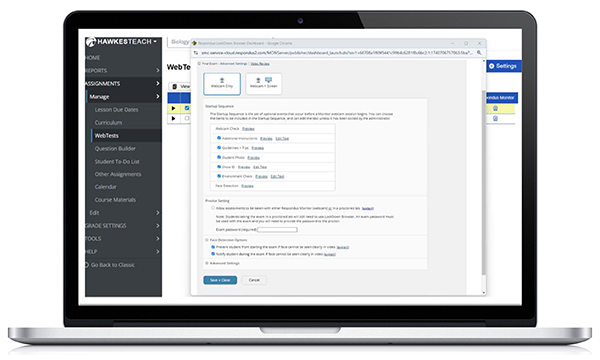
At Hawkes Learning, we believe that ensuring academic integrity should be simple — for both instructors and students. That’s why we’re excited to announce major improvements to our Respondus Monitor integration, making secure online testing easier and more intuitive than ever! Ready to switch to the new integration? Contact support@hawkeslearning.com and our team will help you every step of the way! A Seamless Experience from Start to Finish We’ve listened to your feedback and streamlined the entire process. The new and improved integration creates a smooth, unified workflow that allows instructors to manage everything from setup to review directly in their Hawkes Teach account. No more switching between systems or juggling different platforms. Clickable Walkthroughs Want a quick look at how to use Respondus Monitor within Hawkes? These step-by-step video walkthroughs guide you through exactly what to click and where. Instructor Experience Student Experience What’s Better for Instructors? All-in-One Access: Manage proctoring settings, view exam recordings, and review flagged events — all within your Hawkes Teach account. Save Time: Spend less time managing tech, and more time focused on teaching. Customization: Customize startup sequences (like ID verification and environment scans), adjust face detection settings, and decide whether to allow webcam overrides with a password. Comprehensive Monitoring: Access priority flags, screenshots, and time-stamped video footage of test sessions, or review the entire exam attempt via the student’s webcam in the Proctoring Dashboard. Domain Whitelisting: Easily enable access to approved external resources (e.g., web-based calculators, related YouTube videos, case studies) during LockDown Browser tests using a new WebTest setting. What’s Better for Students? Easy Launch: Students can start Respondus Monitor directly from their Hawkes WebTest. Minimal Setup: All they need is their webcam and an updated version of LockDown Browser®. Focus on the Test: With fewer steps and a smoother login process, students can concentrate on doing their best — not troubleshooting tech. Chromebook™ Support: Students using Chromebooks can now test seamlessly by installing the required Chrome extension. Note: Students must use the Chrome browser to access this feature. Why You’ll Love the Updated Integration: Streamlined for Instructors Improved Usability and Flexibility Simplified for Students Enhanced Academic Integrity Whether you’re setting up your first proctored exam or reviewing results, the process is now faster, easier, and more intuitive than ever. Roles & Responsibilities Course Administrators: You’ll need to configure the Respondus Monitor integration for your school. Once enabled, the settings apply across all Hawkes products. Instructors: After the integration is configured, you can enable Respondus Monitor for individual tests and customize settings to suit your classroom needs. After exams are complete, you can review the Proctoring Dashboard to identify potential academic integrity violations. Students: Just launch LockDown Browser, follow a few simple security checks, and begin the exam. They’ll be locked into the test environment with restrictions in place to prevent cheating but will return to their normal computer state after finishing the exam. Ready to Get Started? When you are ready to switch, contact us and our team will help you every step of the way! Contact us at support@hawkeslearning.com By simplifying the workflow, removing previous barriers, and creating a better experience for instructors and students alike, this integration helps you maintain academic integrity and gain greater peace of mind. Let’s make secure testing simpler, together.
April 22, 2025
At Hawkes Learning, we believe that ensuring academic integrity should be...
Read More
We’ve been busy over the 2024-2025 academic year making your experience with Hawkes even better. Here’s a quick roundup of recent changes you’ll want to know about: A Smoother Navigation Experience We’ve updated the platform navigation to make it easier to find what you need, faster. Whether you’re setting up assignments, checking reports, or managing your sections, the new left-hand layout is designed to streamline your workflow. As an added bonus, this update has also increased processing speeds and laid the groundwork for our teams to make more impactful enhancements to the platform in the future. Respondus Monitor Now Available— Now With Chromebook Compatibility! We upgraded our Respondus Monitor integration! The new and improved integration creates a smooth, unified workflow that allows instructors to manage everything from setup to review directly in their Hawkes Teach account. No more switching between systems or juggling different platforms. Students can now test on their Chromebooks using the new Respondus Monitor integration—no lab access or alternate devices needed. They’ll just install a quick extension from the Chrome Web Store using the Chrome browser. Want to learn more? Check out the blog with step-by-step video walkthroughs (instructor and student experience), a rundown of benefits, and steps for getting started. Configure Sections Enhancement Simply create your new sections, then copy over all settings and assignments from another section—no need to start from scratch. Gain more control over which policies apply to each section Personalize your setup with fewer steps Enjoy a smoother, time-saving experience when getting ready for a new term 2,500+ New Questions Available! We don’t just guess what instructors want, we listen! Based on direct input from instructors like you, we launched a catalog-wide Question Bank Enhancement Project initiative in December 2024 to strengthen our question banks across multiple titles. The goal? Better alignment with your instructional needs through more variety, increased rigor, and improved coverage. → Explore these quick reference guides for a detailed breakdown of the newest questions including their corresponding lessons and serial numbers. Updated Phone System We’ve updated our phone system for faster, more efficient service! When you call, you’ll be prompted to choose from the following options so we can quickly connect you to the right team: #1 for Instructor Support #2 for Student Support #3 for Bookstore Inquiries Now That You’re All Caught Up… We’re excited to provide even more ways to support you and your students this Fall! If you’re already prepping for next term, check out our Course Prep Playlist for helpful videos on everything from customizing your curriculum to LMS integration.
March 13, 2025
We’ve been busy over the 2024-2025 academic year making your experience with...
Read More
Looking for a recap on what’s new in the 2024-2025 academic year? Click here! This week, our development team released some exciting updates to make your Hawkes experience smoother, more efficient, and more intuitive. We’re confident these new features will have a positive impact on your Hawkes courses. Watch the overview video or read on to learn more about what’s new! Instructor Experience Side Navigation Gets a Power-Up! For users who have opted into side navigation, your experience just got even better! We’ve moved key links from the Classic landing pages directly into the side menu under familiar headings. This update provides quicker access to essential features, making your workflow more efficient. Section Configuration Upgrade We’ve enhanced section configuration to give instructors more control over which policies they want to apply to their sections, making course setup more flexible and efficient. This update allows for quicker, more personalized setup, saving time and ensuring a smoother experience. Student Experience AI Tutor Enhancements We’ve updated Hawkes AI Tutor! It is now more responsive and user-friendly than ever. Students will benefit from: Smarter Off-Topic Filtering prevents relevant questions from being mistakenly dismissed, allowing students to get clarification when needed. Better Chat Window Controls make it easier to switch between AI Tutor and their work, reducing distractions. Improved Chat Bubble Behavior minimizes interruptions, keeping students focused during practice sessions. A More Polished Look enhances usability, ensuring a smoother, less intrusive experience, especially on smaller screens. One exciting result of these upgrades is that AI Tutor can now provide step-by-step calculator instructions, helping students understand the process and solve problems more effectively. These updates to AI Tutor create a more efficient and supportive learning environment for students, ensuring students get the help they need, whenever they need it. These are just a few of the exciting changes coming your way at Hawkes Learning. We’re committed to making your experience better and more seamless every step of the way. Stay tuned for more updates, and thank you for being a part of our community! As always, if you have any questions or need assistance, please don’t hesitate to reach out to our Customer Success Team any time at instructorsupport@hawkeslearning.com
March 13, 2025
Looking for a recap on what’s new in the 2024-2025 academic year? Click here!
Read More
We’re excited to announce some powerful new updates to enhance your Hawkes experience. These changes aim to give you more control, streamline your workflow, and improve both instructor and student interactions. Watch the overview video or read on to learn more! Instructor Experience Section Configuration Upgrade Instructors now have greater control over course setup. You can now select exactly which content to configure for your sections, offering more flexibility and customization to meet your unique needs. This enhancement helps you tailor your courses more precisely and work more efficiently. Simplified Section Archiving Keeping your instructor dashboard organized is now easier than ever! Section deletion has been re-enabled and enhanced, allowing you to delete one or multiple sections at once. Additionally, when you delete/archive a section, you’ll automatically receive a CSV export of student grades in the same familiar format as the export generated by exporting data from the All Student Scores Report. Student Experience AI Tutor Enhancements The AI Tutor chat box is now draggable, allowing students to position it within the Practice window wherever is most convenient for them. Students can provide feedback on the AI’s responses using a simple thumbs up/thumbs down system, available for each response. This feedback helps us continually improve the AI Tutor to ensure it’s as helpful as possible. These updates are just one step in our ongoing effort to continuously improve and innovate the platform. We’re committed to delivering the best possible experience, and there’s much more to come to make things even more efficient and effective for both instructors and students. Stay tuned! As always, if you have any questions or need assistance, please don’t hesitate to reach out to our Customer Success Team any time at instructorsupport@hawkeslearning.com
January 31, 2025
We’re excited to announce some powerful new updates to enhance your Hawkes...
Read More
We’re adding quantity and quality to our courseware. At Hawkes Learning, we continuously strive to improve the educational experience for both instructors and students. In response to valuable instructor feedback, we’re excited to announce an ongoing initiative to expand and diversify our question banks across all products to: Provide more comprehensive coverage of topics in assessments Offer greater variety in question types and difficulty levels for increased flexibility Enhance student learning and understanding How to Incorporate New Questions As a valued customer, we will email you directly when new questions become available to assign in your courses. It’s important to note that these new questions are not automatically added to the Hawkes Default Curriculum. You’ll need to take a few simple steps to incorporate them into your assignments or Custom Curriculum using the steps below. If you have any questions about this question bank expansion project or need help assigning them to your courses, our Customer Success Team is always available to help! Contact them any time at instructorsupport@hawkeslearning.com. Adding New Questions to a Custom Curriculum: In your instructor dashboard, select Assignments > Manage > Curriculum. Select any course which has the Curriculum you would like to update assigned. Select a Lesson Name in the left column. New questions will be labeled “New” and displayed towards the bottom of the left column as highlighted in the screenshot below. Select the +Add button to include the questions in your Custom Curriculum. Be sure to Save your changes. Adding New Questions to an Existing Assignment: In your instructor dashboard, select Assignments > Manage > WebTest. Select Manage in the top-right corner, then select the test name and Copy button. Select the Edit icon to the left of the copy of the Test. Select “Default Curriculum” if you have not assigned the questions in a Custom Curriculum yet. Otherwise, select your Custom Curriculum. Select a Chapter, then Lesson from the left column. New questions will be labeled “New” and displayed towards the bottom of the left column as highlighted in the screenshot below. Select the +Add button to include the questions in your assessment. Be sure to Save your changes. Stay Tuned… We’re committed to continuously improving our courseware. Keep an eye out for future updates and expansions to our learning resources!
December 4, 2024
We’re adding quantity and quality to our courseware. At Hawkes Learning, we...
Read More
Hawkes Learning, a leading provider of educational technology solutions, is excited to announce the launch of its newest innovation, AI Tutor. Launched October 1st, and available in all Hawkes courseware, AI Tutor is a secure, AI-driven tool designed to empower students by providing immediate, individualized support with contextualized responses, enhancing mastery, and building confidence. Extending Instructor Impact with AI Tutor AI Tutor acts as a personal tutor for each student, offering guided prompts and simplified explanations to help them better understand complex material. This student-directed learning aid encourages learners to seek in-the-moment guidance as they navigate their coursework, ensuring they remain focused and engaged without external distractions. “Hawkes already has many student support aspects built into the learning sequence, and this is just one more tool in the toolbox!” shared Professor Emily Carpenter of Seminole State College. “The autonomy that students will exercise utilizing the AI Tutor to get automatic support will be invaluable as they build academic success skills AND conceptual knowledge.” “AI Tutor is aligned with my favorite feature of Hawkes–students are never alone. The program is there to support them even if I can’t be.” — Professor Melinda Clardy, South Louisiana Community College A Secure and Ethical Approach to AI in Education With a strong emphasis on security and ethical practices, AI Tutor offers instructors peace of mind by operating within a secure environment. The AI references only vetted Hawkes instructional content, protecting user data and preventing the sharing of answers. AI Tutor encourages a thoughtful approach to learning, prompting students to engage deeply with the material. Explore the Future of Learning with AI Tutor Hawkes Learning invites educators and students to explore how AI Tutor can transform the learning experience and drive student success. This innovative tool represents the future of education, providing a secure, student-centered approach to mastering course material in a technology-forward future. Experience AI Tutor in action at the Innovative Educators Virtual Summit, the industry’s largest gathering of higher education professionals from across the nation. This virtual Summit transcends professional development, offering educators from diverse backgrounds and institutions the chance to shape their teaching journeys through cutting-edge presentations, modern pedagogical approaches, and practical implementation strategies. For more information about AI Tutor and how it can enhance the learning experience, please visit www.hawkeslearning.com/aitutor. “We are thrilled to introduce AI Tutor, a tool that aligns with our commitment to delivering trusted, high-quality, cost-effective educational content and materials,” said Scott Virkler, CEO of Hawkes Learning. “By staying within the course material, AI Tutor ensures that students receive accurate and curriculum-aligned support, tailored to their unique needs.” About Hawkes Learning Partnering with the higher education community since 1979, Hawkes Learning has harnessed the transformative potential of technology to provide reliable course materials and exemplary service in the shared pursuit of student success. By combining student-centered innovation with AI-based tutoring and a proven, mastery learning approach, Hawkes cultivates an effective learning experience for students while simultaneously supporting educators. For more information, please visit www.hawkeslearning.com.
October 1, 2024
Hawkes Learning, a leading provider of educational technology solutions, is...
Read More
In today’s fast-paced digital world, educators are constantly seeking innovative ways to engage students and improve learning outcomes. One tool that continues to prove effective, particularly with Gen Z learners, is the integration of video content into course materials. Key insights from a ScreenPal survey of over 500 educators reveal how video is being used to tackle educational challenges and enhance learning across K-12 and higher education. So, why has video become such a powerful asset in education? We can think of 10 reasons: Catering to a Variety of Students Every student has their own preferences for learning and studying. While some might thrive with just traditional textbooks, many of today’s learners absorb information more effectively with engaging visual and auditory experiences. Video content like those found in HawkesTV and Biology’s Concept Clips bridges this gap by offering a multi-sensory learning experience that can appeal to various learning preferences. Simplifying Complex Concepts Some academic concepts can be challenging to grasp through text alone, especially for visual learners. Videos can break down complex ideas into more digestible pieces, using visual aids, animations, and step-by-step explanations, significantly enhancing understanding. Increasing Engagement With students’ shorter attention spans, focused videos capture and maintain interest more effectively than long text passages. When students are engaged, they’re more likely to absorb and retain information. Flexibility and Accessibility Videos offer unparalleled flexibility in learning. Students can pause, rewind, and re-watch content as needed, allowing them to learn at their own pace. This is particularly beneficial for review sessions or when tackling challenging topics. Enhancing Lecture Preparation and Delivery For instructors, incorporating videos into instruction can add variety and depth to presentations. They can serve as excellent discussion starters or provide real-world context to theoretical concepts. Supporting Flipped Classroom Models Video content is a cornerstone of the flipped classroom approach, where students watch instructional videos before class and use class time for more interactive, hands-on learning activities to expand their knowledge of the concepts they learned at home. Providing Immediate Feedback When coupled with interactive elements like quizzes or discussions, video content can offer immediate feedback to students, helping them gauge their understanding in real-time. Accommodating Modern Learning Preferences Today’s students have grown up in a digital world where video is ubiquitous. Incorporating this familiar medium into education can make learning feel more natural and accessible to the current generation of learners. Facilitating Microlearning Short, focused videos align perfectly with the concept of microlearning – delivering content in small, specific bursts. This approach can improve information retention and make learning less overwhelming, especially for introductory-level students. Expanding Access to Expertise Video allows students to benefit from expert knowledge beyond their immediate instructors. Guest lectures, interviews with field experts, or demonstrations by industry professionals can all be easily integrated through video content. The integration of video into course materials is more than just a trend – it’s a powerful tool for enhancing the educational experience. By leveraging the unique benefits of video content, educators can create more engaging, effective, and accessible learning environments for their students. How Does Hawkes Integrate Multimedia Elements? Hawkes’ student software directly integrates video into the platform to diversify instructional content and empower all types of learners. For example, Biology features 48 short, 2-3 minute Concept Clips, followed by immediate knowledge check questions to help students assess their understanding and identify areas for additional studying while they work. These Concept Clips break down complex biological concepts into easily digestible pieces, helping students grasp intricate and complex concepts quickly and effectively while promoting active learning. Students of all disciplines can also find helpful chapter and lesson-level videos on our free, open-source site, HawkesTV. Are you ready to explore how video can transform your course materials and improve learning outcomes? Click here to request a personalized demo and see the power of video-enhanced homework in action!
August 27, 2024
In today’s fast-paced digital world, educators are constantly seeking...
Read More
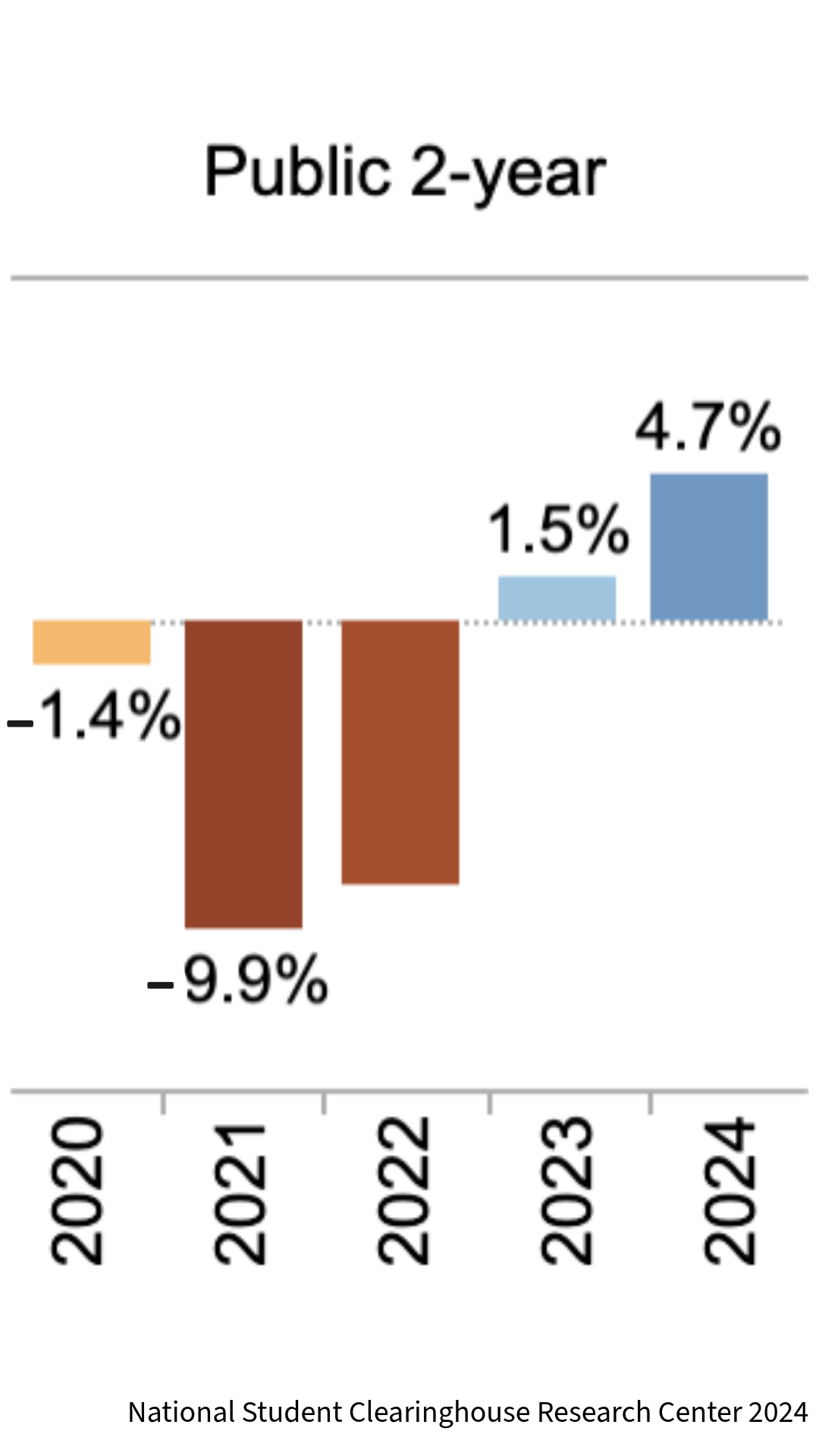
Dear Colleagues, Partners, and Friends, As we wind down the current academic year and prepare for the next, I find myself reflecting on my experiences this past year in the exciting world of EdTech, my first year as CEO at Hawkes Learning and the ever-evolving landscape of higher education. Join me in this open letter exploring the internal and external pressures significantly impacting both Hawkes Learning and the greater educational community. What a Year The world of higher education is arguably moving faster than ever before. Instructors are being asked to do more with less, while students are arriving less prepared and with shorter attention spans. New technology offers many opportunities, which come along with adjacent challenges. Remote learning is prevalent and here to stay, and while Artificial Intelligence holds promise for new learning methods, it also presents additional challenges in maintaining academic integrity. Schools are under pressure to lower costs and demonstrate their value amidst a politically charged environment. As a partner in higher education, it’s crucial that we fully understand these impacts and ensure we are positioned to help. Hawkes Learning is growing as we approach our 45th anniversary next month and our Mastery Learning approach becomes more widely understood and embraced. In an industry where success is often defined by maintaining the status quo year over year, we are growing by nearly 10% annually; I am immensely proud of our team and their efforts to make this happen. We continue to be a leading innovator in the field and remain focused on providing world-class service to our customers, easing the challenges faced by instructors in every way we can. Challenges in Higher Education Value of Higher Education The pressure on higher education to demonstrate its value in preparing students for a modern workforce has intensified, leading to the unfortunate closure of several smaller liberal arts colleges. This environment challenges us to continuously prove our worth and elevate our contributions to student success and career-focused skill-building. The good news on this front is enrollments for this past Spring were up 4.7% YOY for community colleges1. COVID-19 Impact We continue to see the adverse effects of the pandemic on learning for students entering college, particularly in foundational subjects. Hawkes’ courseware, with its powerful learning aids and mastery-based design, stands ready to address these gaps. However, college instructors face immense pressure to either bridge these gaps themselves or advance students prematurely, a practice that is ultimately unsustainable and detrimental to long-term student and societal success. At Hawkes Learning, our dedicated success team provides instructors with expert course implementation support and guidance that empowers them to create more supportive and efficient learning environments, ultimately enhancing student success and reducing stress for both educators and students. Increased Student Stress and Anxiety According to a 2023 Campus Pulse2 survey by Inside Higher Ed, 3 out of 4 students report that stress negatively impacts their academic focus and performance, and 76% of faculty feel that supporting students’ mental health is a job expectation. In a survey Hawkes conducted with faculty this past May, 87% of instructors surveyed felt under-equipped to navigate conversations with students needing support on topics outside of academic content. Additionally, 58% of instructors reported having insufficient mental health resources available at their institution. To help support this need, Hawkes Learning partnered with a group of passionate instructors during Mental Health Awareness Month to offer a free webinar series, aimed at equipping educators with the knowledge and strategies necessary to nurture wellness in the higher education classroom. This well-received series continues to prove valuable, with many people watching the recorded event to gain insights. Cost Initiatives and Financial Pressures Universities are striving to reduce the cost of course materials amidst rising operational expenses. While Inclusive Access programs adopted by many institutions and publishers, including Hawkes Learning, have been a lifeline for bookstore operators, they often do not translate into savings for students. Hawkes Learning is committed to providing truly affordable learning solutions beyond just Inclusive Access and is actively taking steps to lower our course creation costs, passing those savings on to students. For example, in some courses we leverage OER content as a starting point for new materials, then edit, supplement, and enhance it with robust digital learning tools, keeping student prices much lower. Additionally, to enhance our non-math offerings, we’ve launched StudyText, a cost-effective eReader priced at $36 or less for students. This new eReader is expected to significantly boost accessibility and student engagement, promoting both financial and educational sustainability. AI in Education While AI is clearly at the top of the hype cycle, the reality is the growth of AI use by students presents both challenges and opportunities. We see AI as another learning tool for us to collectively use, much like we did as one of the first innovators using adaptive technology and automated just-in-time tutoring. We are committed to leveraging AI to enhance learning while upholding high standards of academic integrity. Internal Developments at Hawkes Learning Team Growth We have welcomed five new veteran industry executives to our team over the past year and hired 20 new employees in total. We are focused on bringing in good people who are committed to working in education. We also believe in the importance of individual growth within our team, so we are providing opportunities for them to develop both professionally and personally. Innovative Educators Summit (IES) We believe that when instructors connect and collaborate, everyone benefits—especially students. That’s why we’ve made it our mission to foster a vibrant network of educators. For over ten years, the Innovative Educators Summit (IES) hosted by Hawkes Learning has been bringing instructors together to share insights, ignite ideas, and build a community of passionate educators. This spring, we had over 2,400 instructors attend the virtual Innovative Educators Summit; following up on that success, we’re excited to host a Fall IES, happening October 10th and 11th! While we will have several themes at this IES, one of major interest will focus on AI in the classroom. Mark your calendars, as this upcoming Summit will be our best yet. AI-Enhanced Tutoring Inside Higher Ed reports that student use of AI is outpacing its use by instructors3. We are piloting the use of AI to expand on our existing just-in-time tutoring help for students, ensuring they receive the support they need to succeed, exactly when they need it. We have been testing AI tools for content creation and assessment generation, but they are not up to our standard at this point. For example, while simply creating assessments is easy, validating them is an entirely different and complex process that requires a human touch. As AI continues to advance, we are committed to finding innovative ways for instructors to leverage its capabilities to enhance engagement and drive student success. Improved Instructor User Interface Over the next year, we will be rolling out a new User Interface for the instructor platform. We are excited about improving the user experience by incorporating valuable feedback from our customers and implementing ways to make course setup and management more streamlined and effective. Customer Support and Service Our focus on providing world-class customer support and service remains unwavering. All companies tout their service and support, but we live it. Our four-ring policy underscores our dedication to live support. While others continue to reduce support staff and hours to cut costs, we maintain 24/7 Live Chat for both students and instructors, achieving a 99.5% chat satisfaction rating by the end of the academic year in June! A Bright Future in Education It is an exciting time to be part of the education ecosystem. Rapid changes create opportunities for companies like Hawkes Learning to innovate and excel. We are ready to rise to these challenges and will continue to make a meaningful impact on education. My team and I are committed to providing the best learning experience possible for both students and instructors. While we can’t solve all the challenges facing educators, we can ensure we are doing our best in the areas we can impact. This means providing a cost-effective, reliable, and secure platform with easy course setup and management capabilities. Moving forward, we will continue to leverage the latest technologies, like AI and robust LMS integrations, and offer penalty-free online learning approaches to reduce student stress and anxiety. Your students can get immediate help and chat with a real person 24/7. And lastly, if you need help, just call us—we will answer the phone. We are devoted to working with the best instructors and institutions in the world to help students thrive on their learning journey. Thank you for your continued support and partnership. Sincerely, G. Scott Virkler CEO, Hawkes Learning https://nscresearchcenter.org/current-term-enrollment-estimates/#:~:text=Current%20Term%20Enrollment%20Estimates%3A%20Spring%202024&text=Gains%20occurred%20across%20all%20major,4.7%25%20over%20spring%20202 ↩︎ https://www.insidehighered.com/news/student-success/health-wellness/2023/05/23/survey-stress-hurting-college-students ↩︎ https://www.insidehighered.com/news/tech-innovation/artificial-intelligence/2023/10/31/most-students-outrunning-faculty-ai-use ↩︎
August 14, 2024
Dear Colleagues, Partners, and Friends,
Read More
Our development team has launched some exciting, and highly requested new features, including some exciting updates to the instructor platform. Watch the video below and read on to learn more about these updates. Instructor Experience Left-hand Navigation is here! Enhance your teaching experience with our all-new instructor navigation interface. By clicking the “Try New Navigation” button, you’ll unlock a streamlined workflow designed to boost efficiency and simplify course administration. This opt-in feature offers a more intuitive way to manage your courses, saving you time and effort. Try it out and let us know what you think! → Watch this short video for more information on this update. New ‘Manage Instructors’ & ‘Manage Sections’ Experiences Manage Instructors Course Admins– say goodbye to tedious instructor creation! The new Manage Instructors page allows admins to create and modify instructor profiles with ease. Create or modify instructors without the need to deal with sections, reducing clicks and saving valuable time. Find specific instructors with powerful filtering and searching tools. Make quick edits to instructor information directly within the table view with inline editing capabilities; no more navigating away to separate edit screens! → Read what Hawkes Faculty Consultant and Professor at Bellevue University, Dr. Jerome Lewis, has to say about the new ‘manage instructors’ interface. Manage Sections Whether you’re creating a single section or managing multiple courses, updates to this tool empower you to work smarter, not harder. Create new sections with only essential information required (owner, name, dates, visibility). Section creation is streamlined with Hawkes’ best practices pre-selected by default. Renamed for clarity, ‘Configure Sections’ allows users to match the settings, assignments, and policies from existing sections. Enhanced filtering and in-line editing capabilities in the Manage Sections table allow for easy modifications of sections. LMS Auto Sync If you use our LMS synchronization tools, Auto Sync will automatically power down one month after the section has concluded. Instructors will be notified if this happens for their course, and they have the option to turn Auto Sync back on at any time. Product Updates Algebra for College Students, 7th Edition is now fully available for use in your courses and available for students to purchase! If you are interested in receiving a desk copy or online access to this title, please reach out to your designated Hawkes representative or email support@hawkeslearning.com. Students can now click on the ‘Purchase Access’ buttons on the product pages for 2nd Editions of Calculus & Single Variable Calculus to get to the student platform and purchase software access directly from the Hawkes platform, which may be a cost-saving option. Students can now click on the ‘Purchase Print Materials’ button on the product page for Algebra Foundations to purchase their textbooks directly from our online bookstore. Resources Now Even More Accessible! New Accessible Chapter Projects are now available in Instructor Resources as well as the Companion Sites for every chapter of several different products. These accessible chapter projects are screen reader friendly and WCAG 2.1 compliant Companion Sites are available for the following disciplines: Calculus Economics English Psychology Sociology Statistics Biology Meet the Team We’ve added a Leadership page to our website featuring names, photos, titles, and professional biographies of our executive team members. Visit the About Us page on our website so that you can get to know and love our team just as much as we do! As always, if you have any questions or need assistance, please don’t hesitate to reach out to our Customer Success Team any time at instructorsupport@hawkeslearning.com
July 26, 2024
Our development team has launched some exciting, and highly requested new...
Read More
At Hawkes, we pride ourselves on upholding an exceptional standard for both student and instructor support. While you’ve been busy preparing for your fall courses, we’ve been working behind-the-scenes on some exciting platform updates to help streamline your course management experience. These updates are designed with one important goal in mind: to make instructors’ lives easier. Starting July 25th, when instructors log in to their Teach account, they’ll see the option to opt-in to a new navigation menu, simplified editing for instructor and section management, an improved course configuration experience, and more. For a deeper insight into these updates, we asked Dr. Jerome Lewis, one of our esteemed Hawkes Faculty Consultants and a key contributor, to share his thoughts. Here’s what he had to say: During the summer months, faculty and course managers work hard putting together syllabi, revising courses, and preparing their instructors for the spring term. Hawkes Learning has also been busy this summer with exciting updates to their platform. As you navigate your summer plans, consider taking a breather to check out the refreshing, new Hawkes navigation setup or perhaps get out of the heat and check out the cool, improved course management section. “As a full-time professor and part-time course coordinator for Introduction to Psychology at my university, I am responsible for setting up and overseeing multiple sections of a course that is taught by a legion of invaluable instructors. Hawkes Learning makes the tasks related to coordinating these course sections simple, straightforward, and swift.“ Personally, I am most looking forward to the streamlined instructor management section. As I mentioned in a previous post, I have been a huge fan of Hawkes Learning’s instructor management setup since I first adopted it for my department’s Introduction to Psychology course. Creating new sections and assigning instructors has always been straightforward. However, Hawkes Learning is always aiming to improve. Over the last several months, I had the opportunity to provide feedback on how to streamline this process even further. I think this collaboration has led to an updated process that is intuitive and even easier. Now, it will only take a few clicks to assign and edit course instructors, create new course sections, and edit course information. Using a spreadsheet approach, many of the features of each course section can be modified individually or as part of a group of sections. Regardless of whether you are working on a single course, managing multiple sections, or managing the materials for your entire department, these platform updates should give you back a few precious summer hours. About the Writer Dr. Jerome Lewis is an Associate Professor in Psychology at Bellevue University. His research focuses on the victim role and the psychology of morality. Dr. Lewis has a keen interest in service and the teaching of psychology. In 2022, he received BU’s Excellence in Service Award.
July 24, 2024
At Hawkes, we pride ourselves on upholding an exceptional standard for both...
Read More
Our development team has launched some exciting new features on our platform, specifically aimed at supporting your course instruction and ensuring student success. Watch the video below and read on to learn more about these updates. Improved All Student Scores Report Settings First, we’ve updated the default settings of the All Student Scores Report for better alignment with best practices, rearranged items for intuitive navigation, and added the ability to see ungraded assignments. This means faster analysis and more informed decisions, which empowers you and other instructors to analyze student scores with greater efficiency and uncover deeper learning trends within your classroom or school. New default settings are Letter Grade, Percentage, Last Login, Icon View, and Assigned Lessons Only Graphic View is changed to Icon View for clarity Save time with optimized default settings aligned with best practices Gain a clearer picture with a reorganized layout that groups similar items together Make data-driven decisions with the ability to view ungraded assignments for a more comprehensive understanding LMS Integration Hawkes Learning is now LTI Advantage Complete Certified! What does this mean? This certification demonstrates Hawkes Learning’s commitment to interoperability and enhancing the user experience through cohesive, easy-to-use educational technology solutions. New Products Available for Use The following new products are now fully available for purchase and use: Grammar Foundations Developmental Mathematics, 3rd Edition Introduction to Psychology, 2nd Edition Preparation for College Mathematics, 3rd Edition If you are interested in receiving a desk copy or online access to any of these titles, please reach out to your designated Hawkes representative or email support@hawkeslearning.com. Companion Sites Lastly, discover Biology in a vibrant new way with our updated Biology companion site where you can now find enticing image previews for each link within Other Resources. In addition to Biology, we also have companion websites available for you and your students for other products such as Calculus Economics English Psychology Sociology Statistics As always, if you have any questions or need assistance, please don’t hesitate to reach out to our Customer Success Team any time at instructorsupport@hawkeslearning.com
May 17, 2024
Our development team has launched some exciting new features on our platform,...
Read More
If you’re looking for LTI Advantage (LTIA) setup and syncing resources, click here. Hawkes integrates with a variety of Learning Management Systems including D2L, Canvas, Blackboard, and Moodle. In these trainings, we will walk you through the steps for setting up and utilizing our instructor grade synchronization and student single sign on tools for each LMS. Blackboard Classic Tools (REST API version) Blackboard Ultra Classic Tools (REST API version) Canvas Classic Tools (LTI 1.1) D2L/Brightspace Classic Tools (LTI 1.3/1.1)
January 3, 2024
If you’re looking for LTI Advantage (LTIA) setup and syncing resources, click...
Read More
Our development team has launched some exciting new features on our platform, specifically aimed at supporting your course instruction and ensuring your students’ success. Watch the video below and read on to learn more about these updates. Inactive Students You asked, we answered! This highly-requested update allows you to hide inactive students from All Student Scores and Assignment Reviewer, two of the key reports, so that you can focus your attention on the students actively working in your course. Hiding inactive students will also prevent their scores from impacting your overall course data, such as class averages and question analytics. If you enroll into your section as a student to experience the course from the student perspective, you can hide yourself from reports as well! Note that while inactive students will still be accessible through the Detailed Student Grades Report, they will be marked as (hidden). We plan to add this functionality to Search by Criteria soon! To mark a student as hidden: Go to the “Tools” tab → Select “Manage Students” Select the checkbox beside the name of the student(s) you would like to hide from the key reports Select “Key Report Visibility” from the menu at the bottom of the page and choose “Hide Student” Once the student has been successfully hidden, “Hidden” will appear in the “Key Report Visibility” column. To “Show” a hidden student: Go to the “Tools” tab → Select “Manage Students” Select the checkbox beside the student name(s) you would like to unhide from the key reports Select “Key Report Visibility” from the menu at the bottom of the page and choose “Show Student” Once the student has been unhidden, the word “Hidden” will be removed from the “Key Report Visibility” column. Improved Question Builder Usability A scroll bar has been added to the following modals in Question Builder for easier navigation: Expression Builder Graph Builder Insert Image Insert Table Permissions Preview Variable Manager New Welcome Screens for Students A new welcome screen has been added for students as they enter each lesson in Learn, providing a more consistent and visually engaging experience. This is the first phase of an exciting project to more fully integrate the imagery from our textbooks into the software. Additional Updates Screen reader compatibility enhancements to ensure clarity and an overall smoother experience for students with visual impairments. Additional experience improvements and bug fixes for both students and instructors As always, if you have any questions or need assistance, please don’t hesitate to reach out to our Customer Success Team any time at instructorsupport@hawkeslearning.com
July 27, 2023
Our development team has launched some exciting new features on our platform,...
Read More
Our development team has released a couple exciting new features to our platform to support your course instruction and your students’ success! Watch the video below & read on to learn more about these updates. Improved Organization of Assignment Reminder Email Digest With this update, instructors will now be able to review which students received automated assignment reminders, improving at-a-glance review and hopefully allowing instructors to take action more quickly if needed. LMS Integration: Moodle Auto Grade Sync For instructors using Moodle and our LMS synchronization tools, you can now choose to automatically sync your Hawkes grades over to Moodle once daily. To set up automatic grade syncing within Moodle: Open the LMS sync tool Navigate to the new ‘Schedule Sync’ tab Check the ‘Sync grades to LMS daily’ on this tab Click ‘Save Changes’ You will still have access to the Assignment Grades tab to manually sync grades over whenever you’d like there to be an exact match between Hawkes and Moodle, but our hope is that this update will allow students to consistently see a more accurate grade in both Hawkes and Moodle while reducing your efforts in syncing grades between the two tools. As always, if you have any questions or need assistance, please don’t hesitate to reach out to your dedicated training and support specialist or email training@hawkeslearning.com.
May 18, 2023
Our development team has released a couple exciting new features to our...
Read More
Hawkes has released a few new features to our online platform! Watch the video below & read on to learn more about these updates. Instructor Platform: Interface Updates Lesson Due Dates First, to continue our interface improvement updates and ensure all pages in the instructor platform match our newer themes, we’ve updated the Create and Update Lesson Due Dates pages. All page functionality remains the same, but we did make one additional improvement to the page with this update. With this release, the calendar view of lessons will now always be visible on the Lesson Due Date page. Instead of only being able to access and view your Lesson Due Dates in calendar view after shifting multiple due dates (or from the Assignments Tab > Calendar), as soon as you make updates to your due dates and save changes, you can open a calendar view model right from this page. All Student Scores Report Facelift We have also given the All Student Scores Report a facelift as well. Much like with all of the other instructor platform pages we’ve updated to date, all reporting functionality remains the same, but we hope releasing this ‘face lift’ helps to continue our grade book continuity efforts. Student Platform: Section Details Option Added Students can now view their section start and end date and section late penalty settings from their to-do list. While the section start and end details have always been visible from the dashboard page, making them and the late penalty settings visible from the to-do list helps to keep students informed on when their class meets and what credit they will receive for assignments if they work after the assignment due dates. Students can select Section Details from their To-do list to view: Section Start and End Dates Section Meeting Times Lesson Late Penalty Settings As always, if you have questions, you can contact your Training & Support Specialist any time at training@hawkeslearning.com.
March 2, 2023
Hawkes has released a few new features to our online platform! Watch the video...
Read More
Hawkes has released a few exciting, highly requested features to our online platform! Watch the video below & read on to learn more about these updates. Assignment Due Date Sync Improvement With this update, due date changes made in Hawkes will update automatically for you in your LMS overnight rather than having to manually update them in your LMS, simplifying the process of updating due dates throughout the semester and dramatically improving your start-of-semester setup! If you use Direct Assignment Links in Canvas or D2L/Brightspace and have Auto-sync enabled, updates to Hawkes due dates made throughout the term will now update anytime auto-sync runs its daily process When copying a course in your LMS, new due dates will sync automatically overnight This update ensures students see consistent assignment due dates between LMS and Hawkes Student Platform: Reset Password by Text Students can now reset their learn.hawkeslearning.com password via a verified text message link in addition to email. New students can add their phone number during the account creation process Existing students can add their phone number by clicking the Name drop-down > Settings > Account New Editions Available for Spring 2023! We released two new editions in the content world, both packed with updates based on feedback straight from our users. If you are interested in learning more and upgrading to the new edition in the spring, please make sure to reach out to your training and support specialist to discuss the free and seamless upgrade process! Click Below to Request a Free Exam Copy 2nd Edition, Foundations of English 3rd Edition, Essential Calculus with Applications As always, if you have questions, you can contact your Training & Support Specialist any time at training@hawkeslearning.com.
December 15, 2022
Hawkes has released a few exciting, highly requested features to our online...
Read More
Hawkes has released two new editions and additional resources for instructors! Watch the video below & read on to learn more about these updates. NEW EDITION – Essential Calculus with Applications, Third Edition We’re excited to release a brand-new edition of our Essential Calculus materials! The textbook, software and eBook will be available for purchase in December and ready to use for the start of spring 2023. A few key features in the new edition include: A new Chapter 0 review chapter that helps to prepare students with the fundamentals for calculus-level content Updated and enhanced examples and applications throughout the book and software to modernize the materials and further help students make business and social science connections Over 350 brand new questions in the software and 343 in the textbook which increases our total question bank by nearly 37% Essential Calculus with Applications, Third Edition Request a free review copy of the textbook Explore the student software NEW EDITION – Foundations of English, Second Edition Another new edition Hawkes title: Foundations of English, Second Edition! The textbook, software, eBook and updated Guided Notebook are available for purchase and adoption for spring 2023 with the updated software coming soon! A few key features in the new edition include: New Chapter 8.7 lesson on APA style and formatting Updated content on MLA style and formatting and common sentence errors Increased diversity and inclusive language including gender-neutral they/them pronouns New exercises and Chapter Projects Foundations of English, Second Edition Request a free review copy of the textbook Explore the student software Algebra & Trigonometry Instructor Resources We released the first edition of Algebra & Trigonometry in May 2022 and now have PowerPoint teaching slides and Chapter Projects! To access them go to teach.hawkeslearning.com > Help > Instructor Resources As always, if you have questions, you can contact your Training & Support Specialist any time at training@hawkeslearning.com.
October 3, 2022
Hawkes has released two new editions and additional resources for instructors!...
Read More
Hawkes has released a few key updates to improve your experience! Watch the video below & read on to learn more about these changes. Assignment Calendar View This new tool will allow you to view all of your Hawkes assignments on the calendar once they are assigned. Color coding that matches the colors in the student platform, category filters, and a search field help you to easily find assignments if you’re looking for something specific on your calendar. Search by Criteria – Assignment Level Filter You can now filter and communicate with a group of students with specific grades on individual assignments. This filter can be combined with any other Grade or Activity filters to help narrow your list for student outreach and can be saved for easy access throughout the term. Assignment Reviewer – Manual Score View Update You can now see all manually-released scores from the Assignment Reviewer results page, making Assignment Reviewer even more comprehensive. Use this report to analyze big-picture performance or narrow down results per student and question. Instructor Created Question Filter We’ve added a new filter that allows you to filter your own Instructor Created questions by difficulty in Assignment Builder. This new filter will allow you to more quickly find and add your custom questions to assignments based on the difficulty you assigned to them upon creation. Additional Updates NEW getting started documentation added to Instructor Resources NEW indicator for Manually Edited grades in the student grade portal As always, if you have questions, you can contact your Training & Support Specialist any time at training@hawkeslearning.com.
July 29, 2022
Hawkes has released a few key updates to improve your experience! Watch the...
Read More
Hawkes has released a few key updates to improve your experience! Watch the video below & read on to learn more about these changes. Instructor Platform: Continued Interface Updates To continue our interface improvement updates and ensure all pages in the grade book match our newer themes, we’ve updated the Manage Lesson Due Date by Section and by Template pages. All page functionality remains the same, but this will help to continue our grade book continuity efforts. New Product Highlight We’ve recently added Algebra and Trigonometry to our lineup! Review the print text and software for free today. Algebra and Trigonometry Request a free review copy of the print text. Request software demo access. Explore All Titles On The Virtual Bookshelf As always, if you have questions, you can contact your Training & Support Specialist any time at training@hawkeslearning.com.
May 18, 2022
Hawkes has released a few key updates to improve your experience! Watch the...
Read More
Hawkes has released a few key updates to improve your experience! Watch the video below & read on to learn more about these changes. Export Certify Assignments You can now easily export Certify assignments from the Lesson Builder tool! We hope that this option creates more opportunities for you and your students to engage with lesson content: Go to Assignments Tab > Curriculum and select the lesson you’d like to export. Click the gear icon at the top right of the screen and select “Export Assigned Questions” from the drop-down menu. Once selected, the assignment will be exported to Microsoft Word where you can further customize and print it out. 300% Screen Zoom As part of our continued accessibility initiatives, students can now zoom in to pages up to 300%. This, alongside the scroll bar, provide a major improvement to page navigation, especially for students accessing the software from a small-screened device. Keyboard Shortcut to Access Keypad To provide additional accessibility, students can now easily navigate to the keypad—from which they can access relevant math expression shortcuts—by using either a keyboard shortcut OR tab-through navigation. New Titles & Editions! We’ve recently added a few new titles & editions to our lineup! Review the print texts, e-books, and software free today. Introduction to Sociology Request a free review copy of the print text. Request software demo access. Viewing Life Mathematically, 2nd Edition Request a free review copy of the print text. Request software demo access. Discovering Business Statistics, 2nd Edition Request a free review copy of the print text. Request software demo access. Reading & Writing Handbook, 3rd Edition Request a free review copy of the print text. Review for free on VitalSource®. Explore All Titles On The Virtual Bookshelf As always, if you have questions, you can contact your Training & Support Specialist any time at training@hawkeslearning.com.
March 10, 2022
Hawkes has released a few key updates to improve your experience! Watch the...
Read More
Hawkes has released a few key updates in preparation for the new year! Watch the video below & read on to learn more about these changes. Enhanced Permission Settings Course Administrators can now share sections between faculty! Sharing sections helps courses run more seamlessly, whether you’re coordinating a co-led course or teaching a corequisite that requires multiple instructors needing access to student information. With this update, Course Administrators may now designate one of five roles to individuals within the Grade Book. These roles allow you to restrict access and hide certain tools & reports from view. Course Administrator: Able to change all users’ settings Instructor: Able to change section settings Teaching Assistant: Able to view/edit grades and attendance, as well as create and assign WebTests View-Only: Able to view grades and attendance. These users can directly access Assignment Reviewer from the All Student Grades and Detailed Student Grades reports Attendance Taker: Able to view/edit attendance Bulk Download PowerPoint Teaching Slides To help you save time, you now have the option to bulk download all PowerPoint teaching slides for a single chapter of your Hawkes title. Remember that once downloaded, you may edit slides to more closely align with your course if you choose. Reminder: All PowerPoint teaching slides are available through your Grade Book under the Help tab → Instructor Resources. Question Builder Graph Alt Text When you create a new question in our Graph Builder tool, you may view and edit the auto-generated alt text, making it easy to ensure that your custom questions are accessible! Additional Updates The first edition Mathematics with Applications in Business and Social Sciences textbook & e-book are coming soon! Instructor Annotated Editions of the print text will be shipped as soon as they are available; e-books will automatically be added to existing accounts. As part of our efforts to improve & streamline all areas of the instructor platform, we’ve updated the Manage Temporary Access Codes page. All functionality remains the same. A horizontal scroll bar has been added to the student platform to help students more easily navigate pages that have been zoomed in up to 200%. Important or time-sensitive maintenance info that impacts the platform’s availability is now visible on the Student Portal, Instructor Portal, & Website to help you plan around maintenance windows. BRAND NEW Titles + VitalSource® eBooks We’ve recently added two new titles to our lineup! Request a free review copy sent straight to your preferred address or review them for free, along with any of our other titles, on VitalSource®. Algebra Foundations Request a free review copy of the print text. Review for free on VitalSource®. Navigating Narratives: A Thematic Reader Request a free review copy of the print text. Review for free on VitalSource®. Explore All Titles On The Bookshelf As always, if you have questions, you can contact your Training & Support Specialist any time at training@hawkeslearning.com.
December 16, 2021
Hawkes has released a few key updates in preparation for the new year! Watch...
Read More
Hawkes has released a few key updates to improve your user experience. Watch the video below & read on to learn more about these changes. Assignments Tab Reordered We’ve grouped the 3 most used options (Lesson Due Dates, Curriculum & WebTests) together at the top of the Assignments tab for smoother course setup. Typically, the first step in the setup process is selecting the lessons you plan to assign to students; next, you’ll want to ensure that the content within these lessons matches your course objectives & curriculum. This is why we’ve placed them in the top spots on this page, followed by the WebTests option so that you can supplement our lessons with your own custom-built assignments, if you so choose. Search By Criteria Now Allows Grade Values Over 100 In Grade Book > Reports > Search By Criteria, you may now enter values over 100% as the maximum search value for Overall Grade & Assignment Group’s Grade. This allows you to more easily find and communicate with students who have received a grade higher than 100% on certain assignments when bonus points are available. Reminder: Once you have filtered your Search By Criteria Report and received a list of students within your desired parameters, you may send an email with the selected students BCC’d and/or save your filter options to easily bring this information back up in the future. Section Details Added to Course Dashboard To help students quickly ensure that they are enrolled in the correct course sections, we have added section start dates & end dates, as well as meeting times, to Section Details on the Student Dashboard. Additional Updates We’ve added a Reveal Password icon to the portal login page so that students can avoid password input issues. Additionally, we have added a Caps Lock notification to let them know if they have Caps Lock turned on. Updated Instructor Resources: 19 new PPT teaching slides covering 8 chapters of English Composition, 2nd Edition content As always, if you have questions, you can contact your Training & Support Specialist any time at training@hawkeslearning.com.
October 7, 2021
Hawkes has released a few key updates to improve your user experience. Watch...
Read More
Hawkes has released a few updates to improve your experience! Read on to learn more. LMS Sync Tool-Show 100 Assignments The LMS Sync Tool now shows the first 100 assignments and students when syncing grades, up from 40, with the option to Show All if still necessary. Student Grade Reports-New Status Available A new lesson status in Detailed Student Grades denotes students who have received credit for a lesson from a Diagnostic Test. Learn more about Diagnostic Tests. WebTest Objective Report-Deactivated Status When using the WebTest Objective Report, you can now distinguish between students whose codes are deactivated when using the student filter. Learn more about WebTest Objective Reports. Edit Scores-Link Back to All Student Scores Report For smoother navigation, if you access the Edit Scores page through All Student Scores Report, you will now find a link to bring you back to the report. Once back on the All Student Scores Report, you will need to rerun the report to retrieve data. Instructor Resources 4 data sets added to statistics companion site for Discovering Business Statistics English companion site created english.hawkeslearning.com Chapter products now available with more content coming soon 20 lesson-level PowerPoints added to Macroeconomics Zip files containing all Macroeconomics, Microeconomics, & Psychology PowerPoints have been created for easier access Questions? Contact your Training & Support Specialist any time at training@hawkeslearning.com.
March 4, 2021
Hawkes has released a few updates to improve your experience! Read on to learn...
Read More
Hawkes is wrapping up the year with a few key updates to improve your experience! Keep reading or watch our video walk through to learn more. *Added December 29th, 2020 Grade Book > Assignment Reviewer > Review By Question For online tests, instructors can now review all student answers to a single test question simultaneously. While the option to review entire tests by student is still available, the new Review By Question functionality provides the option to toggle between all student responses for a specific question without needing to exit and reenter a review for each individual. When an instructor opens a review for a student, they will see a new student navigation option in the upper right-hand corner. Select Assignment Builder Order and use the arrows to move between students. Other filters, such as Hide Correct, still apply to review only incorrect responses. If there are multiple attempts from a student, the graded one will be displayed. Grade Book > Export Grades A new Export Grades page condenses ‘Settings’ and ‘Student Details’ for an improved user experience and easy-to-use interface. Export up to 1000 students directly through the page or receive a report via email if there are more than 1000 students. Course Administrators can select multiple instructors and multiple sections to export at one time. Grade Book > Assignment Reviewer Assignment Reviewer now allows the option to review and edit scores for students with deactivated temp codes. Deactivated students are noted on the Assignment Results page. Grade Book > Timeout Window Increase The overall grade book timeout window has been increased to 60 minutes before automatic log out to provide more flexibility. We have also made several smaller updates, outlined below: Direct link to instructor single sign-on & student login via website homepage. Default LMS Assignment Sync setting no longer includes Hawkes instructor and section name. Option remains to include this data when syncing assignments if needed. New Instructor Resources added: 18 sets of PPT teaching slides for Foundations of English 75 sets of PPT teaching slides for Macroeconomics Chapter projects for Pathways to Mathematics Statistics companion site updates: New data set for “Die Rolls & Probability” in Beginning Statistics, 3rd Edition Step-by-step Rguroo technology instructions added HawkesTV: 34 lesson-level Macroeconomics videos added Questions? Contact your Training & Support Specialist any time at training@hawkeslearning.com.
December 17, 2020
Hawkes is wrapping up the year with a few key updates to improve your...
Read More
Hawkes has released several new features and updates to improve you and your students’ experience! Read on to learn more. Grade Book > WebTests > Assignment Builder – Bonus Questions Instructors can now add bonus questions to their WebTests. Points for a question designated as “bonus” count towards points earned, but do not count towards points possible. Questions are still randomly ordered by default, unless the entire test order is locked, so each student may receive the bonus question(s) at a different point in the exam. Note that there must be at least one question on the test that is not a bonus. To count all questions as bonus, instructors should mark the entire WebTest as “bonus” in the General Settings. Notation for bonus questions has been added throughout Assignment Builder, Assignment Reviewer and Student Tests. Grade Book > Tools > Manage Sections > Hide Sections Instructors can now set a section as “Hidden” under Manage Sections. This setting removes the section from all pages in the Grade Book except Manage Sections, Manage Students and Manage LMS Courses. All data and grades are preserved, but inactive sections will no longer interfere with easily identifying current sections when viewing reports or updating assignments/settings. If an instructor sets a section as “Hidden,” it also hides it from students for enrollment, as well as from Grade Book Course Administrators. Course Administrators can unhide any sections as desired. LMS Sync Tool > Log In with Teach Credentials Instructors will now log into the LMS Sync Tool using their Hawkes Teach credentials. They will then be able to select from any Grade Books/Instructor Accounts that are linked to their Teach account to associate with their LMS Section. Note that Grade Book Course Administrators can select from all instructor accounts for any Grade Books linked to their Teach account. Instructors will no longer need to enter their Course ID or Grade Book password to link sections to their LMS. LMS Sync Tool > Students Tab Hidden by Default The Student tab in the LMS Sync Tool is now hidden by default to prevent the accidental creation of duplicate student accounts. Students will continue to link themselves when accessing Hawkes through the Single Sign On link or deep links. Instructors can elect to show this page during the section linking process, but they likely will not need to enable it. Student Courseware > Practice – Tutor Button Color Updated The Tutor feature in Hawkes includes helpful tools for students, such as step-by-step walkthroughs, hints, links to Learn, and worked out solutions. We have updated the color of the Tutor button in Practice to draw students’ attention to this beneficial learning aid. Student Courseware > Graphing > Dynamic Graphs – Zoom/Pan Functionality Students can now enable zoom in/out and drag/pan functionality for all Cartesian Graphs in Hawkes. Zoom in/out on area via double click, mouse scroll, Context menu, or keyboard shortcuts when the functionality is enabled. Students can also drag/pan a graph across the screen via click and release or keyboard shortcuts when the functionality is enabled. Draggable graph objects can be moved to any point within the graph regardless of the current zoom level. The graph will auto-pan with the point or object as it is dragged outside of the current viewing area. If you have any questions, please don’t hesitate to contact your Training & Support Specialist at 1-800-426-9538 or training@hawkeslearning.com. We hope you continue to have a successful fall term!
October 15, 2020
Hawkes has released several new features and updates to improve you and your...
Read More
Manage all of your grade books and your student account from one central location with the brand new instructor portal. Here’s how to get started: CREATE AN ACCOUNT Go to teach.hawkeslearning.com If you have a student Learn account, use those credentials to log in. **Your email address must be tied to at least one of the instructors in a grade book in order to log in with your Learn credentials. If you have a Learn account but have not added your email to a grade book, doing so enables you to log in to the portal. (Grade Book > Tools > Manage Sections) If you do not yet have a student Learn account, select “Create an Instructor Account” and complete the form inputting your school email address and creating a password. LINK COURSES TO DASHBOARD Upon your initial login, you will be directed to your blank dashboard. Select ‘Add Course‘ to link courses to your dashboard and enter either your Course Link Code or grade book password. If you are adding a first-time user of this course, input the Course Link Code sent to you via email. Course Admins can resend this email (Grade Book > Tools > Manage Instructors/Sections > Instructor Details) if needed. If you are a returning user of this course and have accessed this grade book previously, select your school, courseID, name, and input your existing password. When you add a new course, you may choose to change the course name displayed on your Instructor Dashboard. This edited course name will only be visible on your Instructor Dashboard—it will not impact students, other instructors, or your individual sections in any way. A shortcut tile will appear on your dashboard that you can select to open the corresponding grade book. To link other courses, select ‘Add Course’ and follow the same process to add all of your Hawkes grade books to the dashboard. Dashboard with Course Tiles Added NAVIGATION Select a course tile to open your grade book and then easily switch between courses without returning to the dashboard using the new drop-down menu. From the Instructor Dashboard, select ‘Student Dashboard‘ for single sign-on access to your student Learn account. Questions? Contact your Training and Support Specialist at 1-800-426-9538 or training@hawkeslearning.com.
August 3, 2020
Manage all of your grade books and your student account from one central...
Read More
Before the fall term kicks off, we’ve added more than 80 new questions to the Viewing Life Mathematically question bank. To see the new questions, please log into your Grade Book, navigate to Assignments tab > Curriculum, and open Assignment Builder by choosing a hyperlinked lesson. These questions are labeled by case numbers so that they’re easy to identify. Below is a list of the lessons, case numbers, and topics covered by these new questions: Lesson Case Number Topics 1.1 11 and 12 Critical Thinking and Problem Solving 1.2 11–13 Critical Thinking and Problem Solving 2.1 13 and 14 Set Notation 2.2 14 Subsets and Venn Diagrams 2.3 11 Operations with Sets 2.4 11–14 Applications and Survey Analysis 3.1 9 Logic 3.2 6 Logic 3.3 12 and 13 Logic 3.4 9 Logic 3.4 10 and 11 Logic 4.1 10–13 Rates and Unit Rates 4.2 10 and 11 Ratios 4.3 12 and 13 Proportions and Percentages 4.4 11 Percentages 5.1 10–12 Functions 5.2 10–13 Linear Growth 5.3 13 and 14 Quadratics 5.4 9 and 10 Exponential Growth 5.5 10 and 11 Logarithmic Growth 6.1 13–17 Geometry 6.2 11–14 Geometry 7.1 11 and 12 Probability 7.3 11 and 12 Probability 7.4 11–14 Probability 7.5 11 and 12 Probability 8.1 7–11 Statistics 8.2 12 and 23 Statistics 9.1 11 and 12 Personal Finance 9.2 11 and 12 Personal Finance 9.3 10 Personal Finance 10.3 6–8 Voting and Apportionment 10.4 7–9 Voting and Apportionment 11.1 5 Applications of Geometry to the Arts 11.2 6 and 7 Tiling and Tessellations 12.2 8 Sports Contact your Training & Support Specialist at 1-800-426-9538 if you need help adding these new questions to your lessons!
August 14, 2017
Before the fall term kicks off, we’ve added more than 80 new questions to the...
Read More
We’ve updated the default curriculum to include new questions just in time for the spring term. The updated questions provide a more uniform level of difficulty to give the overall lesson more consistency. Most do not require a calculator for your students to complete. In many cases, these questions cover lesson topics more comprehensively than before. *Please note that these new questions are only available to students using the web platform at learn.hawkeslearning.com.* To see the new questions, please log into your Assignment Builder to view your curriculum. These questions are marked as new and are always located at the very bottom of the lesson so that they’re easy to identify: Here is a list of the new questions and where to find them: Developmental Mathematics Lesson 2.2 Questions 45-50 Lesson 2.3 Questions 10-16 Prealgebra and Introductory Algebra Lesson 2.4 Questions 21-27 Lesson 2.6 Questions 18-21 Beginning Statistics Plus Integrated Review Lesson 4.R.1 Questions 45-50 Lesson 4.R.2 Questions 10-16 Viewing Life Mathematically Plus Integrated Review Lesson 7.R.1 Questions 45-50 Lesson 7.R.2 Questions 10-16 Developmental Math – North Carolina Curriculum Lesson 2.2 Questions 21-27 Lesson 2.4 Questions 44-50 Foundations of Mathematics for Virginia Lesson 1.4 Questions 45-50 Lesson 3.3 Based on instructor feedback, we’ve added one question on the topic of estimating square roots and replaced a few questions with new, more refined problem cases If you have any questions about these updates, please contact your Training and Support Specialist or call 1-800-426-9538.
January 10, 2017
We’ve updated the default curriculum to include new questions just in time for...
Read More
Sorry, but there are no results that match your current filters and search.
Please try a different filter combination.
Efficacy Studies & Testimonials
A Decade of Lasting Corequisite Success at Seminole State College
Nov 11, 2025
Courses: Quantitative Reasoning, Elementary Statistics, Functions and Modeling, and Precalculus for ENG-PHYS-CS Course Type: Corequisite Math Pathways Quick Stats: The percentage of students completing college-level math in a single semester rose from 29% to an average of 73% per term, showing steady, lasting improvement. When surveyed, 100% of students enrolled in a lab (corequisite) course said it helped them succeed in their math class. Background & Overview Seminole State College (SSC) math faculty sought to redesign their math sequence to help students graduate on time and place them into math pathways most relevant to their fields of study.
Read More
Transforming Student Success: How Hawkes Learning Boosted Grades, Retention, and Student Well-Being at Neosho County Community College
Nov 4, 2025
Highlights Improved grades and retention:
Read More
Just-in-time Support: A Testimonial from Lucy Horton, College of Coastal Georgia
Oct 6, 2025
“I would recommend Hawkes wholeheartedly to anyone seeking to integrate an online textbook experience with their students.” Lucy Horton is an associate professor at College of Coastal Georgia and teaches dual enrollment courses at a local high school. She has been teaching dual enrollment courses for three semesters with Hawkes Learning and recently shared her experience. Title Used: Precalculus, 3rd Edition “The amazing folks at Hawkes Learning understand the challenges that educators face each semester and provide unprecedented, personal one-on-one help every time. What I am in awe about most recently is the fact that Hawkes set up three Sundays in a row that corresponded with the start times of various colleges around the country. It was on Sunday afternoon when I realized something was awry with my grade book. I was able to call in on Sunday and talk with a live agent, and they set up a Zoom call with me, shared my screen, and walked me through all the necessary fixes. It is absolutely amazing that a company would provide this amazing service—right in time—for educators trying to be fully prepared and ready for the new semester! Way to go, Hawkes; you guys get it and provide amazing support when it is most needed. I am so grateful! My students appreciate the Hawkes platform for its videos, practice, AI tutor, and opportunities to improve their math skills. The platform provides students with what they need and educators with seamless integration with various college learning platforms. I would recommend Hawkes wholeheartedly to anyone seeking to integrate an online textbook experience with their students. Their educator support is unparalleled in the marketplace. The integration between it and the various college learning platforms makes it effortless for educators trying to assign and grade student work. Thank you, Hawkes Support; you make my job much easier!” “Thank you, Hawkes Support; you make my job much easier!”
Read More
Stay up to date with all the latest News from the Nest!
Receive automatic updates with our latest blog posts, feature announcements, and Hawkes happenings.