
New Navigation & Clearer Naming
In 2025, we updated the platform navigation to a modernized, left-hand navigation to save time, reduce clicks, and make course management smoother and more intuitive.
Since then, we've made a few additional adjustments to the navigation with clearer naming of frequently visited areas in the instructor-side of the platform including:
|
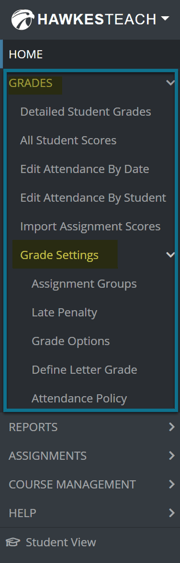 |
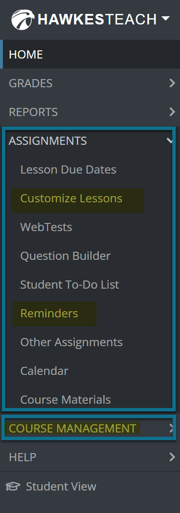 |
.png)
Easy Access to Course Setup & Maintenance Guides
Quickly access Instructor Guides for common course setup and maintenance tasks directly from your Teach account by selecting "Help" in the left-hand menu and then selecting "Instructor Guides."
These guides include step-by-step PDFs and videos about:
-
Start-of-term course setup
-
Assignment configuration (lesson due dates, late penalties, assignment reminders, etc.)
-
How to create a WebTest
-
Grading and reporting features
-
LMS integration
Section Setup is Faster and Easier! (New Copy Section Button)
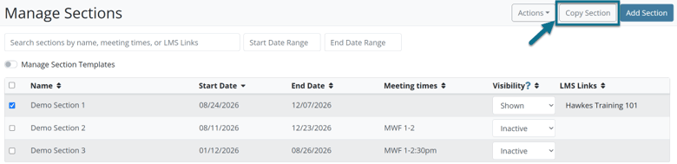
We’ve made section management faster and easier. You can now use the new Copy Section button to duplicate an existing section’s settings in just a few clicks. With a streamlined workflow and validated settings, creating new sections has never been simpler.
Refined eBook Access to Improve Clarity, Accessibility, and Engagement
The eBook tab, which links to an external reading experience, is now instructor-only by default to support accessibility and give students a cleaner, less confusing experience with relevant tabs visible. Students access the eBook content in Learn as a fully accessible, easy-to-navigate, and customizable reading experience. Content in Learn engages students with interactive elements for deeper learning.
Simplified Grading and Communication

This year, Detailed Student Grades (formerly Edit Scores) was enhanced to provide a more streamlined experience for managing student performance. New features include in-report score editing, clearer assignment status indicators, time-on-task visibility, certification progress tracking, improved search functionality, and expanded export options.
→ For more information about the updates to Detailed Student Grades, click here!
Brand New to Detailed Student Grades: ✨Message Assistant
Built into the ‘Send Email’ modal within Detailed Student Grades, this AI-powered tool uses information from student scores to support individualized communication that still feels personal.
 Increased Efficiency: Bulk Editing for WebTest and Other Assignments
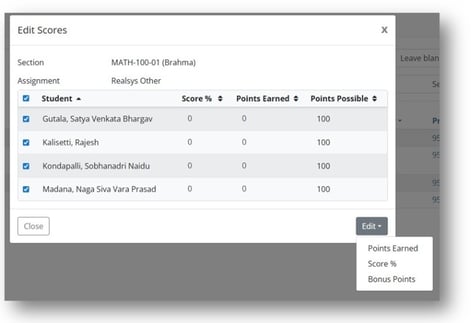
Save time by updating scores for multiple students on the same assignment at one time through the Edit Scores Modal on the All Student Scores Report, for both WebTest and Other Assignment grade types.
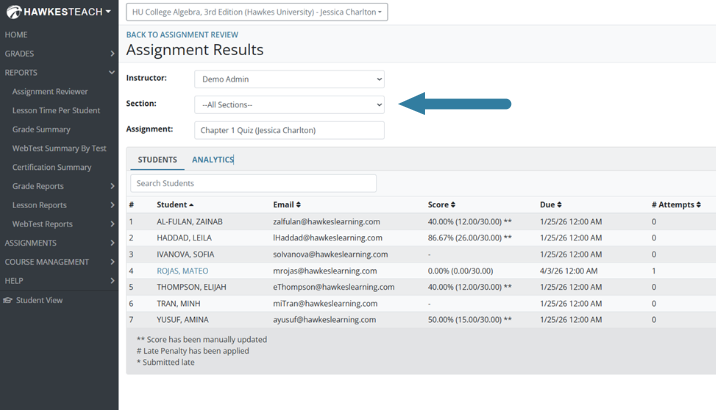
Assignment Results, Now Across All Sections
See a complete view of student performance across all sections in the Assignment Results. Broader visibility into student performance saves you time, so you can focus on remediation and teaching.
Direct Access to Teach via the LMS Sync Tool
An instructor login button has been added to the LMS Synchronization Tool header to provide a direct login path and improve workflow efficiency.

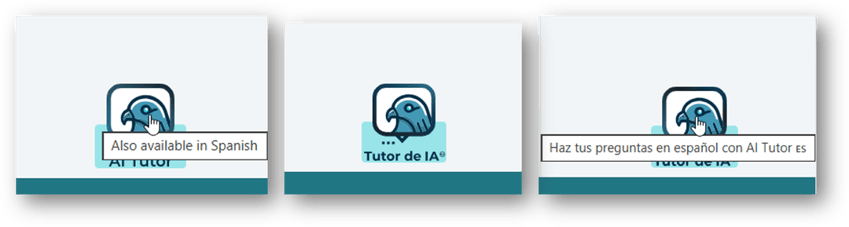
Improved Discoverability of AI Tutor Spanish
When a student’s browser language is set to Spanish as the primary language, the AI Tutor button text now displays “Tutor de IA” and hover text is added to inform users that AI Tutor can communicate in Spanish.
"Send to Instructor" Enhancement
The Send to Instructor feature now reliably captures the full question, no matter the length. This is especially helpful in subjects like Statistics, where long tables or multi-part prompts could be lengthy. Instructors receive the complete context needed to quickly understand what the student is asking.
*As a reminder, instructors need to enable this feature in their section within the Course Management menu, under Display Options.
Now That You’re All Caught Up…
We’re excited to provide even more ways to support you and your students this Fall! If you’re already prepping for next term, check out our Course Prep Playlist for helpful videos on everything from customizing your curriculum to LMS integration.
Recent posts