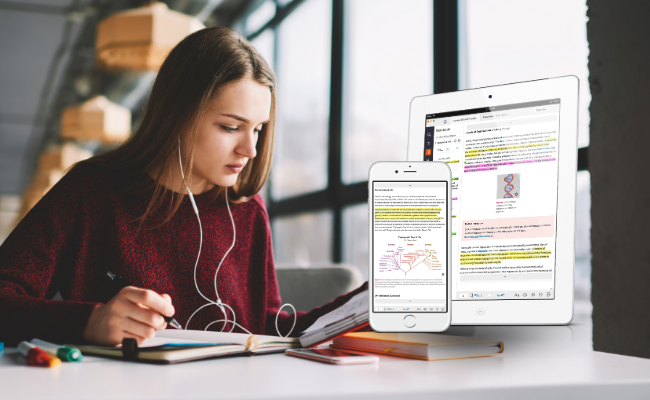
Leaders in educational technology, VitalSource® and Hawkes Learning, are excited to announce a strategic partnership to deliver high-quality, cost-effective learning materials to all students, everywhere, via StudyText. Utilizing VitalSource’s leading ereader, Bookshelf®, Hawkes Learning is offering its content to students with greater flexibility and on-the-go learning capabilities. These low-cost, interactive etexts are available through both the VitalSource and Hawkes Learning eCommerce stores reinforcing their shared commitment to widely accessible and high-quality materials in higher education. VitalSource has been at the forefront of accessibility efforts for over three decades, consistently working to break down barriers and ensure that educational content is available to everyone, regardless of their circumstances; this partnership is a testament to that dedication. "Our mission at VitalSource is to power the learning delivery network that transforms education. This partnership with Hawkes Learning exemplifies our commitment to ensuring every student has access to the tools they need to succeed." — Irene McGuinness, Chief Commercial Officer at VitalSource Hawkes Learning is launching five StudyText titles this fall, marking an exciting milestone toward creating a more affordable and inclusive future in education. By combining advanced technology, student-driven innovation, and expertise in accessible learning materials, these two educational leaders are taking a significant step toward creating educational materials that empower all learners to succeed. “This strategic partnership with VitalSource combines their world-class digital reader with our market-leading content, creating an unparalleled, active learning experience for students. StudyText syncs across devices offering students access whenever and however it is most convenient,” said Scott Virkler, CEO of Hawkes Learning. “We’re thrilled to launch this innovative offering, which not only enhances our value to customers but is also fueling our growth in the rapidly evolving education technology landscape.” For more information about StudyText and to request a sample copy, visit hawkeslearning.com/StudyText.
October 8, 2024
Leaders in educational technology, VitalSource® and Hawkes Learning, are...
Read More
Have you found yourself sitting in your office during office hours wondering why students are not there for help? If so, you are not alone. Before the pandemic, I spent most of my office hours feeling frustrated because I wanted to help my students who needed help but were reluctant to seek the help they needed. Determined to mitigate this help-seeking dilemma, I enrolled in professional development courses on fostering belonging and effective teaching strategies, with a focus on remote learning. I also read a 2019 study from Dr. Ervin J. China on Academic Help-Seeking Behaviors. One of the most important things I learned is that students are more likely to seek help when their professors display what Dr. China described as “professorial concern” in his study. We as instructors can achieve this by expressing genuine concern for our students and creating a learning environment where students feel safe, supported, and valued. Other results from the study along with the tools I learned in the courses lead me to the strategies I share in this piece Here are five practical strategies that I use to create a sense of belonging and connection in my classes: Use The Syllabus To Set The Tone For Your Classroom Culture Our syllabus is more than just a list of rules and objectives. It is an opportunity to communicate our values and expectations to students. When crafting the syllabus, use personal and inclusive language. Be clear about our commitment to creating a supportive learning environment. I developed an equity-minded syllabus based on the Center for Urban Education’s Syllabus Review Guide. This syllabus includes information about both academic and non-academic support services, such as counseling, the food pantry, and finances. It also helps students to navigate the course and learn where and how to seek help when needed. Promote Help-Seeking Let our students know that we are there to help them succeed. Remind them that it is okay to ask for help in whatever way they are most comfortable, and that we will not judge them for not knowing something. To promote help-seeking, I first rebranded my office hours as “student support hours.” I then changed drop-in student support hours to appointments through a Calendly link. Having students schedule their support sessions encouraged them to be thoughtful and intentional about time management. This new, post-pandemic option for a virtual conference provides greater flexibility for those who are working, caring for children, or otherwise may have difficulty coming to the main campus I also created an online discussion forum where students were able to ask questions and get help from each other. Embrace Diversity and Inclusion Create a learning environment where all students feel welcome and respected. This means being mindful of our language and teaching practices and being open to hearing different perspectives. One way I achieve this is through the images I display in my instructional presentations. I intentionally highlight unique perspectives and experiences—from military veterans to members of the LGBTQ community, along with those of different races, ethnicities, and those with both visible and invisible disabilities. This is important because these perspectives are representative of the students that I teach. Representation is an essential component for creating a sense of belonging. Additionally, I begin each lesson with a different motivational quote from a wide range of voices, including humanitarians, scholars, civil rights leaders, poets, hip-hop artists, pop-culture icons, and sports figures. Communicate Regularly and Provide Timely Feedback Keep students informed and motivated by reaching out to them regularly. Regular contact and timely feedback for students, particularly in online courses, signifies our presence and concern for their success. I frequently share information with my students through email, announcements, and news posts in the course learning management system. I make a point of responding to student questions and concerns promptly and also provide detailed feedback on each student’s tests. To ensure the line of communication flows in both directions, I incorporated a weekly “check-in” requirement. On Sundays, students submit a check-in form where they share their progress for the week along with any questions or issues. On Mondays, I read those check-ins and respond appropriately, many times extending a direct invitation for students to meet with me for assistance. Specific and timely feedback is essential for student success. When students know where they are going wrong, they can make the necessary corrections and improve their performance. Give Students Voice and Agency Partnering with students and allowing them to have input into what happens in our classroom is another way to promote engagement and a sense of community. One way to give students voice and agency is to use a Start-Stop-Continue survey. This type of survey asks students to share what they like, do not like, and would like to see changed about our classes. I administer this survey after the first test and incorporate immediate changes based on the feedback. As a way to provide agency, students in my introductory statistics course were permitted to choose their own teammates for the group project along with their research topic. This autonomy led to group cohesiveness and genuine interest in the content they studied. Letting students have a say in what happens in the classroom helps them feel more invested in their learning. I have had an 800% increase in the number of students who met with me for assistance this academic year. Results: Improved Student Help-Seeking, Success Rates The results of these changes have been overwhelmingly positive. I have had an 800% increase in the number of students who met with me for assistance this academic year (54 appointments this year compared to 6 last year). Additionally, overall success rates in my online courses have also improved. These small but effective practices positively impacted student help-seeking and success rates, underscoring the importance of creating a supportive learning environment for students. By creating a sense of belonging and connection, we can encourage students to seek help when they need it, fostering greater academic success. About the Writer April Crenshaw is an Associate Professor of Mathematics entering her 17th year at Chattanooga State Community College. Professor Crenshaw serves as lead teacher for precalculus and is a Co-PI for the Tennessee Board of Regents OER grant for Introductory statistics. Additionally, she is a second-year doctoral student in Peabody College of Education and Human Development’s three-year Learning and Leadership in Organizations (LLO) program at Vanderbilt University. At home, April is a devoted wife and loving mother to her two intelligent, beautiful daughters.
June 7, 2023
Have you found yourself sitting in your office during office hours wondering...
Read More
Explore an application-driven approach to core sociological concepts with the NEW Introduction to Sociology textbook, e-book & software! With straightforward, approachable language, this introductory-level course summarizes key topics and explores them through the lenses of major theoretical perspectives while fostering data literacy, critical thinking, and self-awareness. Students gain a balanced, thoughtful approach to understanding the impactful ways that individuals and society shape one another with this easy-to-follow curriculum. Foster Lasting Knowledge with Textbook Features Including: Real-World Applications Relevant examples and scenarios including social issues like racial justice, COVID-19, feminism, LGBTQ+ rights, climate change, and politics encourage students to use their sociological imaginations to find connections to their own experiences and the world around them. These applications are at the heart of the textbook. Further Resources Different students have different learning styles. The additional resource links are highlighted throughout each chapter to help students connect concepts to outside sources ranging from TED Talks to contemporary data & studies. Dig Deeper Sidebars in the textbook contextualize complex topics to deepen understanding through a further examination of related ideas and real-life scenarios. Interactive Exercises and Activities Reflection Questions, Chapter Projects, On Your Own Activities, & Group Activities prompt students to apply lessons in real-time. Through these interactive activities and open-ended exercises, they make connections and develop their sociological imagination. Want a complimentary examination copy? Request one today by emailing info@hawkeslearning.com! Questions? Contact us.
October 7, 2022
Explore an application-driven approach to core sociological concepts with the...
Read More
Kick off the new year with a webinar training series focused on course customization, new features, and student success! Join us to learn more about our newest features & tools and sit in on sessions covering course prep basics for the upcoming semester. Click on each session title to watch the recording! Checklist for the Spring Term Ensure your new sections are ready for students this spring with our quick, 5-step checklist. Learn to push previous course shells forward or set up an entirely new course in this 15-minute walkthrough. Editing a Homework Assignment Customize Certify assignments by adding and removing questions, moving questions between lessons, requiring practice, and more. Join this webinar to see how quick and easy it is to edit homework in Hawkes. 3 Features to Consider This Spring Hear our recommendations for 3 features that you should consider using this Spring. Easy to set up automation and customization options can make a big impact on the student learning experience in Hawkes! 1. Permissions 2. Show Work 3. WebTest Late Penalty 5 Ways to Use All Student Scores The All Student Scores Report is one of the most comprehensive locations in the instructor platform to monitor your student’s progress through your course. Think of it as a one-stop hub where you can view grade information on assignments, edit grades, review assignments, and check student login history to ensure that they are keeping up with their work. Learn 5 ways to use the All Student Scores Report. Online Testing Crash Course Get a quick rundown of the basics of Hawkes’ test generator. Learn how to create an online test and make it available for your students to take in this 15-minute overview. We will also highlight our brand new WebTest Late Penalty option which gives you added flexiblity when creating online assessments. Tips to Increase Student Engagement Having trouble keeping your students motivated to complete their course work? In this webinar, learn some tips and functionality you can implement in Hawkes to help increase student engagement in your course. Advanced Test Settings Overwhelmed by settings or just want to learn about new options for your tests this spring? Let us breakdown customizable settings including late penalties, diagnostic testing, bonus questions, prerequisite assignments, student-specific accommodations, multiple attempts, question pooling, lockdown browser, and more! Build Your Own Questions with Question Builder Have you ever wanted to create your own custom questions to add to your course? Let us guide you through our robust Question Builder tool that allows you to create a variety of custom content you can add to your course. Reviewing Student’s Work Get a walkthrough of how to review your student’s performance on Hawkes assignments. Not only can you review every attempt on Certify and tests but learn how you can now review tests by question! Increasing Online Test Security Join this mini session for tips for to make your online tests more secure and protect the integrity of your exams, including a brief overview of Hawkes compatible online proctoring solutions. What’s New: Spring 2022 Join us for a review of the features and tools we released this past academic year and a preview of exciting updates to come! Measure SLO’s with the Test Objective Report Use our Test Objective Report to measure, analyze, and report custom student learning outcomes in your course. Join this 15-minute webinar to learn how to get these set up before the spring term!
January 1, 2022
Kick off the new year with a webinar training series focused on course...
Read More
We’re kicking the summer off with a webinar training series focusing on best practices for distance learning and course customization. We are highlighting our newest features and tools and covering the basics of preparing your courses for upcoming semesters along the way. While we’re always here to offer customized, one-on-one assistance, we hope you enjoy these additional Hawkes refreshers! Check out the on-demand webinars below. Preparing for a New Semester – In this webinar, we will help you prepare for the start of a new semester by walking you through the steps for setting up a new section in Hawkes. This training will include the basics of creating new sections, whether you are starting fresh or updating your previously created settings and templates. We will highlight reminders, assignment groups, late penalties, and lesson due date templates. Customizing Learn, Practice, and Certify – In this webinar, we will walk you through a detailed overview of our new Lesson Builder. This tool, released over the past year, allows you to customize the content of our lessons in a variety of ways. We will share the steps for adding/removing questions from our default curriculum, moving questions between lessons, and adding your own content to Learn Screens. Assignment Builder: Creating Custom Tests, Quizzes, and More – In this webinar, we will provide a detailed overview of our Assignment Builder for WebTests. This tool allows you to create your own online and printable assignments to supplement the Hawkes lessons. We will walk you through the basic navigation and functionality of the tool, as well as the wide range of customizable settings available when assigning these quizzes or tests online. Advanced Grade Book Features – In this webinar, we will show you some of the more advanced features available in your Hawkes Grade Book. We will highlight customizing the Student To-Do List, ‘Visible On’ lesson due dates, unique Curriculum settings, Learn Screen Notes, diagnostic testing, and the basics of Question Builder. What’s New: Summer 2020 – In this webinar, we will take a look back at some of the exciting features and tools that were released over the past year. A few highlights to look forward to include Student Certify Reviewer, Show Work, Lesson Builder, and students’ ability to retake Practice WebTests. We will also review our Assignment Reviewer and Learn Screen Notes tools. Reporting & Analytics Overview – It’s all about the analytics! In this webinar, we will share some of our most widely used reporting tools available to help you review your end-of-semester grades and student performance. These reports include All Student Scores, Detailed Student Grades, Search by Criteria, and our comprehensive Assignment Reviewer tool. Mastery Learning Made Simple – This 20 minute webinar will provide an overview of the student experience using the Hawkes software. See how adaptive technology meets a competency-based approach to create an ideal environment for online learners. Join for a walk through of the customizable learning modules and the simplistic 3-step process to mastery of course objectives: Learn, Practice, Certify. Question Builder Overview – In this training, we will take an in depth look at our Question Builder. This tool allows you to create your own questions that can be included in Lessons or WebTests. We will guide you through the steps for creating various question types including multiple choice, free response, open ended, click to select, and click to insert. We will also show you how to use our variable manager to create dynamic questions, incorporate graphs, and add tutoring options. LMS Integration: Setup and Syncing – Hawkes integrates with a variety of Learning Management Systems including D2L, Canvas, Blackboard, and Moodle. In these trainings, we will walk you through the steps for setting up and utilizing our instructor grade synchronization and student single sign on tools for each LMS.
July 1, 2020
We’re kicking the summer off with a webinar training series focusing on best...
Read More