
Planning a course takes time,
finding high-quality instructional materials shouldn’t.
The Instructor Resource Library brings together free, ready-to-use teaching resources organized by course and accessible directly from your Hawkes Learning Teach account. Everything is designed to support your instruction, reinforce mastery-based learning, and save you valuable prep time.
Whether you’re building a lecture, planning an activity, or looking for ways to strengthen student engagement, these resources are already aligned to your course and ready when you need them.
What You’ll Find in the Instructor Resource Library
Each resource is created to be flexible, practical, and easy to integrate into your existing course, no extra setup required.
Lecture PowerPoints
Editable slide decks aligned to Hawkes course content help you structure lectures quickly and confidently. Use them as-is or customize to match your teaching style, pacing, and classroom priorities.
Downloadable Projects
Real-world, application-based projects give students opportunities to practice concepts beyond routine problem sets. These assignments are designed to encourage deeper understanding, collaboration, and transferable skills.
Group Activities
Low-stakes, interactive activities support peer learning and discussion whether in class or online. These resources help students talk through concepts, learn from one another, and stay actively engaged.
Critical Thinking & Reflection Questions
Thought-provoking prompts help students connect course material to practical scenarios, explain their reasoning, and reflect on their learning process supporting both mastery and metacognition.
Why Instructors Use the Instructor Resource Library
- Saves time by reducing prep and content creation
- Supports mastery-based learning with aligned materials
- Fits naturally into your course—nothing extra to manage
- Free and included with your Hawkes course access
The goal is simple: help you teach with confidence, using resources that feel like they already belong in your classroom.
How to Access Instructor Resources
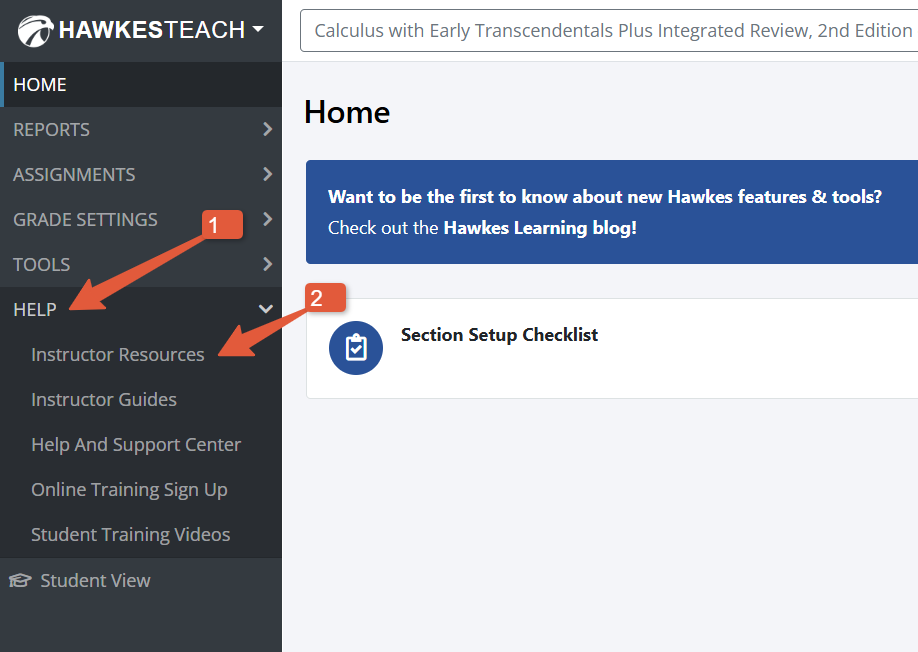
Getting started takes just a few clicks:
- Log into your Hawkes Learning Teach account
- Select your course from the Courses Overview page
- Open the Help dropdown in the left-hand menu
- Choose Instructor Resources
That’s it! No additional setup. No extra cost.
Frequently Asked Questions
Additional Free Teaching Tools:
Companion Websites
In addition to the Instructor Resource Library, Hawkes also offers Companion Websites. These convenient, course‑specific resource hubs support both instructors and students with ancillaries like:
- Free technology guides and data sets
- Student-facing Chapter Project downloads
- Helpful links and supplemental materials
- Verified Quizlet sets aligned to your Hawkes content
Companion Websites are currently available for:
Recent posts