Instructors

Instructor Support

Top-notch support is at the core of what we do. Your dedicated Customer Success Representative is available year-round for personalized guidance, while our Customer Support team is standing by to help with any immediate questions. Plus, our curated resources make it easy to find answers anytime you need them.


Need help now?
Live chat support is available 24/7.
Phone support Monday–Friday, 8 AM–9 PM ET | 843-571-2825
Schedule an online training session for guided setup or questions.


Course Set Up & Maintenance

Everything you need to get your course up and running: quick-start tools, training videos, and step-by-step setup guides.

Classroom Resources

Ready-made resources to enhance your teaching and encourage student engagement.

Learning Opportunities

Professional development opportunities to connect, learn, share, and grow with fellow educators.

Instructor Guides

Required Steps for a Successful Course Launch

Use these essential steps resources to set up and prepare your course and start the term with confidence. 


  • Section Setup for New Instructors video   |  pdf

  • Section Setup for Returning Instructorsvideo   |  pdf

Deep Dive Resources

Get step-by-step guidance on building and customizing your course and assignments.


  • Creating Your Course Section video  |  pdf

  • Setting Up Lesson Due Dates video  |  pdf

  • Returning Instructors: Updating Lesson Due Dates for an Upcoming Term video  |  pdf

  • Managing Assignment Groups video  |   pdf

  • Setting Up Lesson Late Penalties video  |  pdf

  • Setting Up Automatic Assignment Reminders video  |  pdf

  • Customizing Lessons  video  |  pdf


Assessments & Other Assignments 

Use these resources to create and manage assessments as well as additional assignments.


  • Creating WebTest Assignmentsvideo  |  pdf

  • Assigning & Managing WebTest Settings video   |  pdf 

Course Administrators

Manage instructor access and shared course templates with resources designed for course administrators.


  • Managing Instructor Access video  |  pdf

  • Creating & Sharing Templated Sections video  |  pdf

Integrating Hawkes with Your LMS

Use these guides to set up Hawkes integration with Canvas, Brightspace, Blackboard, or Moodle.


AI Tutor

AiTutor - an interactive tool for students in Practice modeThis powerful, student-directed tool offers immediate, 24/7 guidance toward a deeper understanding, never simply giving them the answer. It’s like having a tutor on call, ready to walk them through every challenge.

Staying within the course material keeps students free from distractions and ensures they receive relevant, consistent, and accurate responses.

Explain Error
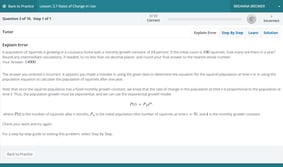


Mistakes are part of learning—but students need more than just a red “X.”

Explain Error identifies exactly where the student went wrong and provides them with a clear, step-by-step explanation, helping them understand the why, not just the what.

Reporting & Analytics
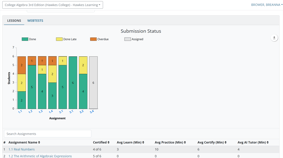


The course management system contains robust reporting tools so you can track how students are doing on any assignment in real time. Detailed performance reporting and analytics allow you to keep a finger on the pulse of your classroom.

Practice Testing
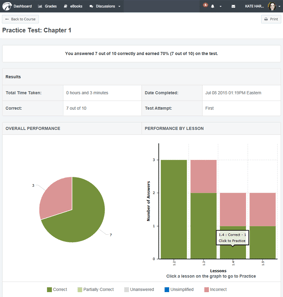
Practice Testing-1These personalized, low-stakes assessments allow students to reinforce their understanding, build confidence, and receive a detailed breakdown of competencies to identify strengths and weaknesses, ensuring targeted practice.


Solutions & Hints
Calculus-Solution
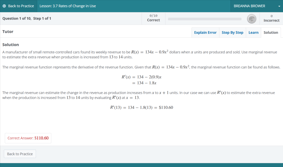
Students are provided helpful hints and detailed, step-by-step solutions that break down the problem solving process before attempting the problem again with new values, turning “I don’t get it” into “I’ve got this.”

Instructional Videos

Lesson overview and example-level videos break down complex concepts through clear, visual explanations. Students can pause, rewatch, and learn at their own pace, building deeper understanding and empowering them to tackle tough problems independently.
 

Start of Term Setup

Required Steps for a Successful Course Launch

Use these essential steps resources to set up and prepare your course and start the term with confidence. 


  • Section Setup for New Instructors video   |  pdf

  • Section Setup for Returning Instructorsvideo   |  pdf

Deep Dive Resources

Get step-by-step guidance on building and customizing your course and assignments.


  • Creating Your Course Section video  |  pdf

  • Setting Up Lesson Due Dates video  |  pdf

  • Returning Instructors: Updating Lesson Due Dates for an Upcoming Term video  |  pdf

  • Managing Assignment Groups video  |   pdf

  • Setting Up Lesson Late Penalties video  |  pdf

  • Setting Up Automatic Assignment Reminders video  |  pdf

  • Customizing Lessons  video  |  pdf

  • Manage Students  video  |  pdf


Assessments & Other Assignments 

Use these resources to create and manage assessments as well as additional assignments.


  • Creating WebTest Assignmentsvideo  |  pdf

  • Assigning & Managing WebTest Settings video   |  pdf

  • Other Assignments & Inputting Grades  video  |  pdf

  • Creating a Diagnostic Test & Viewing Resultsvideo  |  pdf

  • Creating Questions Using Question Builder video  |  pdf

Grading & Reporting

Review student progress, explore grade details, and access reports that help you monitor performance.


  • Grades: All Student Scores — video | pdf

  • Grades: Detailed Student Grades — video | pdf

  • Reports: Assignment Reviewer — video | pdf

  • Reports: Search by Criteria — video | pdf

Course Administrators

Manage instructor access and shared course templates with resources designed for course administrators.


  • Managing Instructor Access video  |  pdf

  • Creating & Sharing Templated Sections video  |  pdf

End of Term

Finish the term confidently with tips for course wrap-up and incomplete section setup.


  • End of Semester Tips video  |  pdf
  • How to Create an Incomplete Section video  |  pdf

Integrating Hawkes with Your LMS

Use these guides to set up Hawkes integration with Canvas, Brightspace, Blackboard, or Moodle.


AI Tutor

AiTutor - an interactive tool for students in Practice modeThis powerful, student-directed tool offers immediate, 24/7 guidance toward a deeper understanding, never simply giving them the answer. It’s like having a tutor on call, ready to walk them through every challenge.

Staying within the course material keeps students free from distractions and ensures they receive relevant, consistent, and accurate responses.

Explain Error


Mistakes are part of learning—but students need more than just a red “X.”

Explain Error identifies exactly where the student went wrong and provides them with a clear, step-by-step explanation, helping them understand the why, not just the what.

Reporting & Analytics


The course management system contains robust reporting tools so you can track how students are doing on any assignment in real time. Detailed performance reporting and analytics allow you to keep a finger on the pulse of your classroom.

Practice Testing

Practice Testing-1These personalized, low-stakes assessments allow students to reinforce their understanding, build confidence, and receive a detailed breakdown of competencies to identify strengths and weaknesses, ensuring targeted practice.


Solutions & Hints

Calculus-Solution
Students are provided helpful hints and detailed, step-by-step solutions that break down the problem solving process before attempting the problem again with new values, turning “I don’t get it” into “I’ve got this.”

Instructional Videos

Lesson overview and example-level videos break down complex concepts through clear, visual explanations. Students can pause, rewatch, and learn at their own pace, building deeper understanding and empowering them to tackle tough problems independently.


 

Course Set Up & Maintenance

Instructor Resources

Find everything you need to support your course, including Lecture PowerPoints, downloadable projects, group activities, critical thinking and reflection questions, and more.

To access:

  • Log into your Teach account
  • Select your course
  • Click the “Help” dropdown in the left-hand menu
  • Choose Instructor Resources
Support at Your Fingertips

Whether you’re looking for instructor resources or sharing help links with students, the Hawkes Support Center has it all. Access how-to articles, video tutorials, and step-by-step guides—available anytime you need them.

Explore the Support Center »

Companion Websites

These convenient resource sites supplement your teaching with free technology guides, downloadable projects, and other helpful links and material for both instructors and students.

Viewing Life Mathematically

Calculus

Economics

Psychology

Statistics

Sociology

Biology

English

News from the Nest Hawkes Blog

Stay in the loop with News from the Nest, your go-to for information about platform updates, new titles, instructor stories, and guest posts from educators and Hawkes Student Ambassadors, all in one place.

Check out the blog »

Classroom Resources

Instructor Resources

Find everything you need to support your course, including Lecture PowerPoints, downloadable projects, group activities, critical thinking and reflection questions, and more.

To access:

  • Log into your Teach account
  • Select your course
  • Select the “Help” dropdown in the left-hand menu
  • Choose "Instructor Resources"

Support At Your Fingertips

Whether you’re looking for instructor resources or sharing help links with students, the Hawkes Support Center has it all. Access how-to articles, video tutorials, and step-by-step guides—available anytime you need them.

Explore the Support Center »

Companion Websites

These convenient resource sites supplement your teaching with free technology guides, downloadable projects, and other helpful links and material for both instructors and students.

Viewing Life Mathematically

Calculus

Economics

Psychology

Statistics

Sociology

Biology

English

News from the Nest Hawkes Blog

Stay in the loop with News from the Nest, your go-to for information about platform updates, new titles, instructor stories, and guest posts from educators and Hawkes Student Ambassadors, all in one place.

Check out the blog »

AI Tutor

AiTutor - an interactive tool for students in Practice modeThis powerful, student-directed tool offers immediate, 24/7 guidance toward a deeper understanding, never simply giving them the answer. It’s like having a tutor on call, ready to walk them through every challenge.

Staying within the course material keeps students free from distractions and ensures they receive relevant, consistent, and accurate responses.

Explain Error


Mistakes are part of learning—but students need more than just a red “X.”

Explain Error identifies exactly where the student went wrong and provides them with a clear, step-by-step explanation, helping them understand the why, not just the what.

Reporting & Analytics


The course management system contains robust reporting tools so you can track how students are doing on any assignment in real time. Detailed performance reporting and analytics allow you to keep a finger on the pulse of your classroom.

Practice Testing

Practice Testing-1These personalized, low-stakes assessments allow students to reinforce their understanding, build confidence, and receive a detailed breakdown of competencies to identify strengths and weaknesses, ensuring targeted practice.


Solutions & Hints

Calculus-Solution
Students are provided helpful hints and detailed, step-by-step solutions that break down the problem solving process before attempting the problem again with new values, turning “I don’t get it” into “I’ve got this.”

Instructional Videos

Lesson overview and example-level videos break down complex concepts through clear, visual explanations. Students can pause, rewatch, and learn at their own pace, building deeper understanding and empowering them to tackle tough problems independently.

 

Accessibility

Accessibility Support

When accessibility questions come up, Hawkes Learning is here to help. Visit our Accessibility page to learn more about our goal and commitment to creating accessible learning experiences for every student. You can also read On Track to Meet Accessibility Requirements: We've got your back. for a broader update from Hawkes Learning leadership.

For product-specific information or documentation for an institutional review, contact the Accessibility Team at accessibility@hawkeslearning.com.

We're Here To Set You Up For Success

The Hawkes Learning Customer Success team provides comprehensive support tailored to meet your teaching needs and ensure student success.
Sign up for assistance with course setup, curriculum customization, test generation, LMS integration, and more.
Schedule an Online Training

AdobeStock_305701484
Sjt3

Resources For Your Students

Show students how to log in and navigate their courseware for the first time. Students can also access this information in the Student Resources section.

Involvement Opportunities

Get Involved!

Share your real-world examples and insights with the community through guest blogs, webinars, case studies, and more.p guides.

Keep Learning and Growing!

Tune in to live virtual events to discover new strategies and build connections in the educational community.

Join us at the Innovative Educators Summit!

Attend or present at IES to connect with peers, explore fresh ideas, and expand your professional network.

Professor Niki Stovall-Prairie View A&M University

"I can always count on Hawkes for anything—student support, instructor assistance, and more. Their customer service is outstanding, available 24/7, ensuring we receive help immediately, even after midnight and on weekends."

Professor Niki Stovall
Prairie View A&M University

Always available – our exceptional support team is here for you.

📞 Phone: Monday - Friday, 8:00 AM - 9:00 PM ET, 843-571-2825

💬 Chat: Available 24/7